
Anime-style barista holding a steaming cup of coffee in a cozy cafe with a chalkboard reading "Support Backyard Drunkard".

Help Us Build a Better Backyard Drunkard ❤️

We’re an independent, passion-driven platform. Your support truly means everything to us.

How to Reroll in NTE (Neverness to Everness): Best Characters and Tips

Published on

in

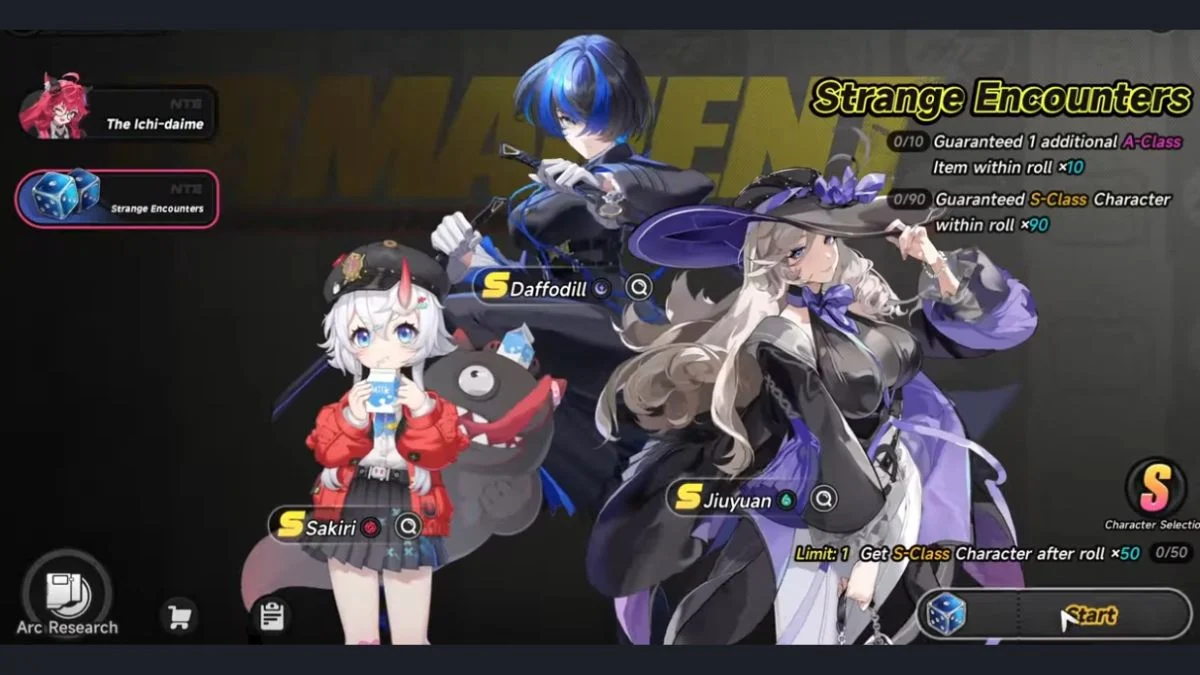
Neverness to Everness Strange Encounters Standard Banner featuring S-Rank characters Daffodill, Sakiri, and Jiuyuan.

Neverness to Everness gives you a surprisingly generous pull economy right from the start, which makes rerolling more rewarding here than in most other gacha titles. There is no 50/50 system on the limited banner, which means every hard pity guarantees the featured character. However, getting the right standard banner characters early can still make a big difference to your team options, and that is exactly where rerolling comes in.

⚠️ Disclaimer: The reroll methods described in this guide, including email salting and multi-instance tools, exist in a grey area with respect to NTE’s Terms of Service. While bans for rerolling are extremely rare in the gacha genre and no action has been taken by Hotta Studio at the time of writing, we cannot guarantee these methods are risk-free. Proceed at your own discretion. 

Do You Need to Reroll in NTE?

Neverness to Everness gives you a surprisingly generous pull economy right from the start, which makes rerolling more rewarding here than in most other gacha titles. There is no 50/50 system on the limited banner, which means every hard pity guarantees the featured character. However, getting the right standard banner characters early can still make a big difference to your team options, and that is exactly where rerolling comes in. ⚠️ Disclaimer: The reroll methods described in this guide, including email salting and multi-instance tools, exist in a grey area with respect to NTE's Terms of Service. While bans for rerolling are extremely rare in the gacha genre and no action has been taken by Hotta Studio at the time of writing, we cannot guarantee these methods are risk-free. Proceed at your own discretion.  In This Post:+ Do You Need to Reroll in NTE?How to Reroll in NTE: The Salting MethodStep-by-Step Reroll ProcessHow Many Pulls Do You Get Per Reroll?The Alternative Method: Google or Facebook LoginWhat Should You Reroll For in NTE?When Should You Stop Rerolling?Reroll Tips to Keep in Mind Do You Need to Reroll in NTE? The short answer is no, rerolling is not mandatory. NTE provides the following for free without any reroll effort: Free A-Rank characters: Aurelia, Adler, Haniel, and Mint through story progression Free S-Rank characters: Esper Zero (your protagonist) and Chiz, who you unlock through City Tycoon progression (around level 15–20, exact unlock point may vary slightly by account) One S-Rank of your choice from the Standard Banner Selector at 50 pulls (discounted to 40 pulls thanks to the 20% beginner discount) One random S-Rank upon hitting pity on the Standard Banner (soft pity at 75, hard pity at 90) Enough pulls and Annulith to guarantee Nanally on the limited banner if you commit to the grind However, rerolling lets you land a second S-Rank character before hitting the selector, which gives you a broader roster from day one. If you enjoy the process, it is worth doing. https://www.youtube.com/watch?v=AMnlFfI_4rU How to Reroll in NTE: The Salting Method The easiest and fastest way to reroll in Neverness to Everness uses a technique called email salting. This lets you generate unlimited unique accounts from a single email address without ever creating a new one. Salting works by adding a symbol to your main email address to produce a new address that automatically forwards all emails back to your main inbox. Here are examples of how it works: Using the + method: youremail@gmail.com (main) youremail+1@gmail.com (reroll 1) youremail+2@gmail.com (reroll 2) Using the . method: youremail@gmail.com (main) your.email@gmail.com (reroll 1) y.ouremail@gmail.com (reroll 2) Both methods can combine and repeat indefinitely, so you never run out of reroll accounts. Step-by-Step Reroll Process Create a new account using the Email Login option with a salted address. Do not use Google or Facebook login at this stage. Play through the tutorial until you reach the city and unlock the gacha system. This takes approximately 15 to 20 minutes with practice. Skip all optional cutscenes and dialogue where possible to speed things up. Open your Mailbox and claim all pre-registration rewards and launch rewards. Every account receives pre-registration rewards regardless of whether you actually pre-registered. Redeem all active codes for extra Annulith before pulling. Active codes at launch include NTE0429, NTENANALLYGO, NTENOWTOENJOY, NTEGIFT, and NTEHAVEFUN. Pull on the Standard Banner first using all your Fabricated Dice, then use your Solid Dice and Annulith on the Limited Banner. Evaluate your results. If you are happy with what you pulled, keep the account. If not, log out from the main menu and repeat with a new salted address. Once you settle on an account, link your Google or Facebook account through the User Center so you can log in conveniently going forward. https://www.youtube.com/watch?v=YM7AJuzfu5Y How Many Pulls Do You Get Per Reroll? Banner TypePulls Per RunStandard Banner~40 (with 20% beginner discount)Limited Banner~20 to 30 In total, you can expect around 31 Fabricated Dice and approximately 2,500 Annulith per run from pre-registration rewards, login bonuses, and launch codes. Since the first 50 Standard Banner pulls have a 20% discount (costing 8 Fabricated Dice per 10-pull instead of 10), you effectively get 40 Standard pulls before needing to spend Annulith. The Alternative Method: Google or Facebook Login If you want your main email attached to the account you ultimately keep rather than a salted one, you can follow this alternative process: Log in with a Google or Facebook account Play through the tutorial and complete your pulls If you want to keep the account, go to the User Center and bind a salted email address to it Unbind your Google or Facebook account Log out and repeat with a fresh Google or Facebook login for the next run Once you find the account you want to keep, you can bind your main email or Google account to it permanently. Note: Normal email logins cannot be unbound once set. However, you can log in using a linked Google or Facebook account instead of typing the salted email every time. Also be aware that some players accidentally bind their main Google or Facebook account too early during a throwaway run — make sure to only do this on the account you intend to keep. https://www.youtube.com/watch?v=fbLVaqLvB-M What Should You Reroll For in NTE? Your main target during rerolls is getting two S-Rank characters before hitting the Standard Banner Selector, ideally with at least one being a top-tier unit. Here is how the Standard Banner characters stack up for reroll purposes: TierCharacterRoleWhy They MatterTier 0JiuyuanBurst DPSStrong AoE grouping, self-healing, pairs excellently with Nanally in Blossom teamsTier 0DaffodillBurst DPSBest Break DPS in 1.0, enables break-focused teams, the only Chaos character at launchTier 1SakiriSupportBest overall support with huge ATK buff, strong CC and grouping, part of key elemental reactionsTier 1FadiaSupportMakes teams nearly unkillable, best defensive option, grows in value significantly in endgameTier 1HathorBurst DPSProvides a free 10% crit rate buff to the whole team when Remora triggers, unlocks special furniture that gives free daily gear modules; ranked higher than first impressions suggest due to her team-wide crit value, though she can be interrupted during her ultimate against bossesTier 2BaicangMain DPSDecent DPS but outclassed by free characters Chiz and Nanally in early game; requires Daffodill to reach full potential Nanally sits above all of these as the priority limited banner target. However, since her banner only runs for two weeks, your realistic reroll goal should focus on standard banner characters first and chase Nanally through normal gameplay. When Should You Stop Rerolling? Here is a quick decision guide: OutcomeWhat to DoPulled Nanally on the Limited BannerKeep the account immediatelyPulled two S-Ranks, at least one is Tier 0Strong account, worth keepingPulled two Tier 1 S-RanksSolid start, consider keepingPulled one S-Rank before 40 pullsKeep going, use selector on a top-tier characterOnly pulled one weak S-Rank, no NanallyReroll recommended One important tip: do not rush to use your Standard Banner Selector. You will hit another S-Rank at pity within 25 to 30 pulls after unlocking the selector, so waiting lets you pick a character that complements what you already have rather than risking a duplicate. Reroll Tips to Keep in Mind Rerolling on PC is slightly faster due to shorter load times and easier account management between runs. PC and emulator users can also run multiple instances simultaneously to reroll several accounts at once, which significantly cuts down the total time needed to find a good result. Do not cling to a run just because you got a decent A-Rank roster. The game gives you plenty of A-Rank characters naturally through progression. Save your Annulith for the Limited Banner rather than spending it all during the reroll. The Standard Fabricated Dice are enough for four multi-pulls per run, which is a fair test. Getting an early S-Rank before pull 40 is an absolute reason to keep that account, as it lets you use the selector on a completely different character. The salting method works on mobile and PC. PlayStation players should reroll on mobile first, then log into their chosen account on PS5 afterward. You are highly unlikely to get banned for using salted emails, but proceed at your own discretion. Neverness to Everness launched on April 29, 2026, and its gacha system is genuinely one of the more player-friendly setups in the genre right now. The guaranteed limited banner pity, the free S-Rank selector, and the sheer amount of early pull currency mean you can build a strong team without excessive rerolling. That said, if you want to optimise your start and enjoy the process, the salting method makes rerolling quick, clean, and completely manageable.
Image via Hotta Studio, a Perfect World Company.

The short answer is no, rerolling is not mandatory. NTE provides the following for free without any reroll effort:

  • Free A-Rank characters: Aurelia, Adler, Haniel, and Mint through story progression
  • Free S-Rank characters: Esper Zero (your protagonist) and Chiz, who you unlock through City Tycoon progression (around level 15–20, exact unlock point may vary slightly by account)
  • One S-Rank of your choice from the Standard Banner Selector at 50 pulls (discounted to 40 pulls thanks to the 20% beginner discount)
  • One random S-Rank upon hitting pity on the Standard Banner (soft pity at 75, hard pity at 90)
  • Enough pulls and Annulith to guarantee Nanally on the limited banner if you commit to the grind

However, rerolling lets you land a second S-Rank character before hitting the selector, which gives you a broader roster from day one. If you enjoy the process, it is worth doing.

How to Reroll in NTE: The Salting Method

The easiest and fastest way to reroll in Neverness to Everness uses a technique called email salting. This lets you generate unlimited unique accounts from a single email address without ever creating a new one.

Salting works by adding a symbol to your main email address to produce a new address that automatically forwards all emails back to your main inbox. Here are examples of how it works:

Using the + method:

  • youremail@gmail.com (main)
  • youremail+1@gmail.com (reroll 1)
  • youremail+2@gmail.com (reroll 2)

Using the . method:

  • youremail@gmail.com (main)
  • your.email@gmail.com (reroll 1)
  • y.ouremail@gmail.com (reroll 2)

Both methods can combine and repeat indefinitely, so you never run out of reroll accounts.

Step-by-Step Reroll Process

  1. Create a new account using the Email Login option with a salted address. Do not use Google or Facebook login at this stage.
  2. Play through the tutorial until you reach the city and unlock the gacha system. This takes approximately 15 to 20 minutes with practice. Skip all optional cutscenes and dialogue where possible to speed things up.
  3. Open your Mailbox and claim all pre-registration rewards and launch rewards. Every account receives pre-registration rewards regardless of whether you actually pre-registered.
  4. Redeem all active codes for extra Annulith before pulling. Active codes at launch include NTE0429, NTENANALLYGO, NTENOWTOENJOY, NTEGIFT, and NTEHAVEFUN.
  5. Pull on the Standard Banner first using all your Fabricated Dice, then use your Solid Dice and Annulith on the Limited Banner.
  6. Evaluate your results. If you are happy with what you pulled, keep the account. If not, log out from the main menu and repeat with a new salted address.
  7. Once you settle on an account, link your Google or Facebook account through the User Center so you can log in conveniently going forward.

How Many Pulls Do You Get Per Reroll?

Banner TypePulls Per Run
Standard Banner~40 (with 20% beginner discount)
Limited Banner~20 to 30

In total, you can expect around 31 Fabricated Dice and approximately 2,500 Annulith per run from pre-registration rewards, login bonuses, and launch codes. Since the first 50 Standard Banner pulls have a 20% discount (costing 8 Fabricated Dice per 10-pull instead of 10), you effectively get 40 Standard pulls before needing to spend Annulith.

The Alternative Method: Google or Facebook Login

If you want your main email attached to the account you ultimately keep rather than a salted one, you can follow this alternative process:

  1. Log in with a Google or Facebook account
  2. Play through the tutorial and complete your pulls
  3. If you want to keep the account, go to the User Center and bind a salted email address to it
  4. Unbind your Google or Facebook account
  5. Log out and repeat with a fresh Google or Facebook login for the next run

Once you find the account you want to keep, you can bind your main email or Google account to it permanently.

Note: Normal email logins cannot be unbound once set. However, you can log in using a linked Google or Facebook account instead of typing the salted email every time. Also be aware that some players accidentally bind their main Google or Facebook account too early during a throwaway run — make sure to only do this on the account you intend to keep.

What Should You Reroll For in NTE?

Your main target during rerolls is getting two S-Rank characters before hitting the Standard Banner Selector, ideally with at least one being a top-tier unit. Here is how the Standard Banner characters stack up for reroll purposes:

TierCharacterRoleWhy They Matter
Tier 0JiuyuanBurst DPSStrong AoE grouping, self-healing, pairs excellently with Nanally in Blossom teams
Tier 0DaffodillBurst DPSBest Break DPS in 1.0, enables break-focused teams, the only Chaos character at launch
Tier 1SakiriSupportBest overall support with huge ATK buff, strong CC and grouping, part of key elemental reactions
Tier 1FadiaSupportMakes teams nearly unkillable, best defensive option, grows in value significantly in endgame
Tier 1HathorBurst DPSProvides a free 10% crit rate buff to the whole team when Remora triggers, unlocks special furniture that gives free daily gear modules; ranked higher than first impressions suggest due to her team-wide crit value, though she can be interrupted during her ultimate against bosses
Tier 2BaicangMain DPSDecent DPS but outclassed by free characters Chiz and Nanally in early game; requires Daffodill to reach full potential

Nanally sits above all of these as the priority limited banner target. However, since her banner only runs for two weeks, your realistic reroll goal should focus on standard banner characters first and chase Nanally through normal gameplay.

When Should You Stop Rerolling?

Here is a quick decision guide:

OutcomeWhat to Do
Pulled Nanally on the Limited BannerKeep the account immediately
Pulled two S-Ranks, at least one is Tier 0Strong account, worth keeping
Pulled two Tier 1 S-RanksSolid start, consider keeping
Pulled one S-Rank before 40 pullsKeep going, use selector on a top-tier character
Only pulled one weak S-Rank, no NanallyReroll recommended

One important tip: do not rush to use your Standard Banner Selector. You will hit another S-Rank at pity within 25 to 30 pulls after unlocking the selector, so waiting lets you pick a character that complements what you already have rather than risking a duplicate.

Reroll Tips to Keep in Mind

  • Rerolling on PC is slightly faster due to shorter load times and easier account management between runs. PC and emulator users can also run multiple instances simultaneously to reroll several accounts at once, which significantly cuts down the total time needed to find a good result.
  • Do not cling to a run just because you got a decent A-Rank roster. The game gives you plenty of A-Rank characters naturally through progression.
  • Save your Annulith for the Limited Banner rather than spending it all during the reroll. The Standard Fabricated Dice are enough for four multi-pulls per run, which is a fair test.
  • Getting an early S-Rank before pull 40 is an absolute reason to keep that account, as it lets you use the selector on a completely different character.
  • The salting method works on mobile and PC. PlayStation players should reroll on mobile first, then log into their chosen account on PS5 afterward.
  • You are highly unlikely to get banned for using salted emails, but proceed at your own discretion.

Neverness to Everness launched on April 29, 2026, and its gacha system is genuinely one of the more player-friendly setups in the genre right now. The guaranteed limited banner pity, the free S-Rank selector, and the sheer amount of early pull currency mean you can build a strong team without excessive rerolling. That said, if you want to optimise your start and enjoy the process, the salting method makes rerolling quick, clean, and completely manageable.

Leave a Reply

Backyard Drunkard Logo

Follow Us On


Categories


Discover more from Backyard Drunkard

Subscribe now to keep reading and get access to the full archive.

Continue reading