

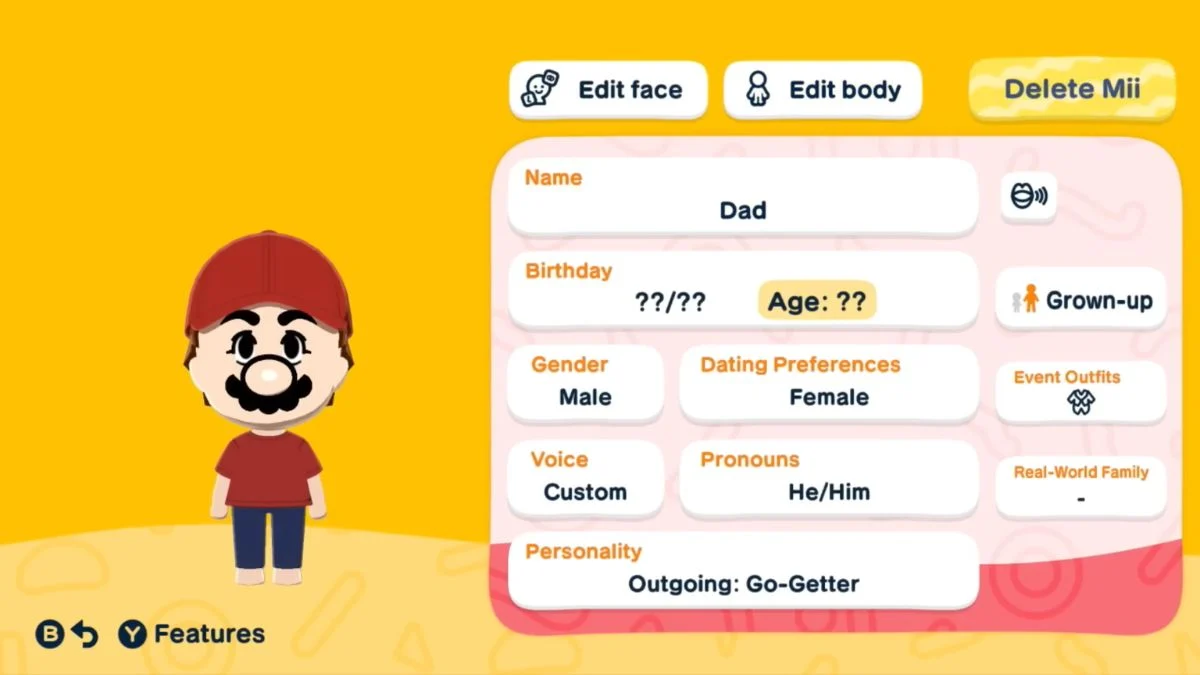
Tomodachi Life: Living the Dream lets you populate your island with up to 70 Miis, and sometimes a character just is not working out the way you planned. Whether you made a typo in a name, regret a personality choice, or simply need to free up a slot for someone new, the good news is that deleting a Mii is entirely possible. However, there are a few important things to know before you confirm that removal, because the process is permanent and it does come with a cost.
Deleting Mii in Tomodachi Life: Living the Dream
| Detail | Information |
| Game | Tomodachi Life: Living the Dream |
| Developer | Nintendo |
| Release Date | April 16, 2026 |
| Platform | Nintendo Switch / Nintendo Switch 2 |
| Max Miis Per Island | 70 |
| Can You Delete a Mii? | Yes |
| Deletion Cost (US) | $33 in-game currency |
| Deletion Cost (EU) | €33 in-game currency |
| Deletion Cost (Japan) | ¥3,300 in-game currency |
| Is Deletion Permanent? | Yes, cannot be undone |

Yes, You Can Delete a Mii
You can delete a Mii in Tomodachi Life: Living the Dream at any point after you progress far enough through the early tutorial to unlock resident editing. The option does not appear immediately when you first load into the game, so if you are not seeing it yet, simply continue through the opening sections and it will become available.

The 70-Mii island limit is the most common reason players need to remove a resident. Once your island hits that cap, the option to add new Miis stops working entirely. Deleting one frees up a slot, and you can then bring in a new resident to replace them. It is worth noting that the 70-Mii limit only applies to your active island population at any one time, not to the total number of Miis you can ever create across your playtime.
How to Delete a Mii: Step-by-Step

You can access the deletion option through the Residents menu. Follow these steps exactly:
- Press the X Button on your controller to open the main menu.
- Select Residents from the menu options.
- Tap or select the Mii you want to remove from the resident list.
- Open the Mii editing screen for that character.
- Select the Remove Mii or Delete Mii option located in the upper-right corner of the editing screen.
- Review the moving fee cost that appears on screen.
- Select Remove again to confirm the deletion.
Your chosen Mii will leave the island immediately after confirmation. Their apartment becomes vacant, and their slot in the 70-Mii roster opens up for a new resident.
Alternatively, Nintendo’s official support page confirms you can also access this through the software’s support flow via the HOME Menu, then navigating to the Delete a Mii option within the game’s settings path.

What It Costs to Delete a Mii

Deleting a Mii is not free. Nintendo charges a moving fee in in-game currency every time you remove a resident, and the amount varies depending on your region and language settings:
| Region / Language | Deletion Cost |
| English (US) | $33 (in-game) |
| English (EU) | €33 (in-game) |
| Japanese | ¥3,300 (in-game) |
This fee comes directly out of your island’s in-game funds, not your real wallet. However, the cost is non-refundable regardless of the reason for deletion, so it is worth being certain before you confirm. Players who are newer to the game and have fewer in-game funds should be aware this cost exists before cycling through Miis freely.
What Happens When You Delete a Mii
Before you confirm any deletion, it helps to understand exactly what disappears along with the Mii:
- The Mii leaves permanently. There is no recovery option once you confirm. Deleted Miis cannot be restored through any in-game method.
- Their money is not refunded. The moving fee you pay is gone regardless of outcome.
- Their relationships are erased. Any friendships, rivalries, or social bonds that Mii had built with other residents disappear along with them.
- Married partners revert to single. If the Mii you delete was married to another resident, that partner becomes single again immediately after the deletion.
- Their apartment becomes vacant. The slot opens up for a new resident, which is the primary reason most players use the deletion option.
Important Restrictions to Know
You cannot delete the last Mii on your island. If only one resident remains, the Remove Mii option will not let you proceed. You need to create at least one new Mii first before the game allows you to delete the existing final resident.
The Remove Mii option only appears after early tutorial progress. If you are in the very opening stages of the game and cannot find the option in the editing screen, continue progressing through the tutorial. The feature unlocks once you reach a certain point in the early game.

Should You Delete or Edit Instead?
Before committing to a deletion, it is worth considering whether editing the Mii solves the problem instead. The Edit Mii screen gives you access to a wide range of customization options that may address the issue without the permanent consequences of deletion:
- Name and pronunciation – If the text-to-speech engine is mispronouncing a Mii’s name, you can fix the phonetic spelling in the editing menu without changing how it appears visually on screen.
- Personality sliders – If a Mii is causing arguments or behaving in ways you did not intend, you can adjust their Movement, Speech, Energy, Attitude, and Overall trait sliders from the same Edit Mii screen.
- Appearance – Facial features, body type, and clothing are all adjustable without needing to start from scratch.
- Voice – Voice pitch, speed, and tone can all be changed after creation.
If the problem is something that editing can solve, adjusting the Mii is always a better option than paying the moving fee and losing all their established island relationships permanently.
Why Does the 70-Mii Limit Exist?
Miis in Tomodachi Life: Living the Dream are not static background decorations. They actively roam the open island, develop relationships, get hungry, experience emotions, and make demands of your attention even when you are not directly managing them. Simulating that level of autonomous behaviour for more than 70 characters simultaneously pushes the hardware’s processing limits. The open-island format of Living the Dream is also significantly more demanding than the apartment-based structure of the 3DS original, which supported up to 100 Miis, and the reduction to 70 reflects that increased simulation load.


Leave a Reply