


Power Simulator X is a Roblox training simulator where you build up your hero or villain from scratch, grinding stats and hunting for rare auras to dominate the competition. Free codes hand you Tokens and Aura Rerolls that would otherwise take serious grind time to earn, so redeeming them as early as possible makes a real difference.
All Latest Power Simulator X Codes (July 2026)
| Code | Reward |
| GUILD | 500 Tokens |
| 60KLIKES | 450 Tokens and 2 Aura Rerolls |
| 50KLIKES | 500 Tokens |
| 20KLIKES | 250 Tokens and 2 Aura Rerolls |
| THANKYOU | 250 Tokens and 2 Aura Rerolls |
| 10KLIKES | 200 Tokens and 2 Aura Rerolls |
| 5KLIKES | 100 Tokens and 1 Aura Reroll |
Redeem these as soon as you can. Codes in Power Simulator X are time-limited and can expire without prior notice.

Expired Power Simulator X Codes
These codes no longer work. They are listed here so you do not waste time trying them:
| Code | Status |
| LAUNCHDAY | Expired |
| 1KLIKES | Expired |
How to Redeem Power Simulator X Codes
Before you can redeem codes in Power Simulator X, you need to complete the game’s tutorial first. Once that is done, follow these steps:
- Launch Power Simulator X on Roblox
- Click the Codes button in the top-left corner of the screen. It displays as the symbol: </>
- Type or paste a working code into the text field that appears
- Press Enter to submit the code
- Your Tokens and Aura Rerolls will be added to your account instantly
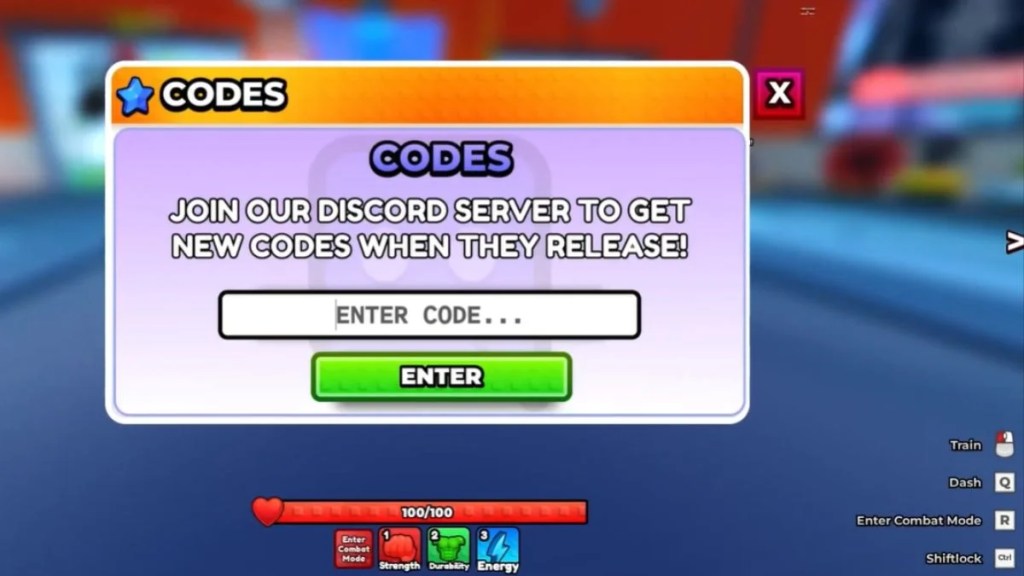
It is worth copying and pasting codes directly from this list rather than typing them manually, as even a single incorrect character will cause the redemption to fail.
Why Are My Power Simulator X Codes Not Working?
If a code is not working for you, there are a few straightforward reasons to check:
Extra spaces in the code. A common mistake is accidentally including a space before or after the code when typing it in. Copying and pasting directly from this list avoids that issue entirely.
The code has expired. Power Simulator X codes do not last forever, and some disappear without a formal announcement. If the game shows an expiry message, that code is no longer active.
The code is already redeemed. Each code can only be used once per account, so attempting to redeem the same code a second time will not work.
Capital letters matter. Codes in Power Simulator X are case-sensitive, so make sure the capitalisation matches exactly as shown in the list above.
What Do Tokens and Aura Rerolls Do?
Understanding what you are redeeming for makes the codes even more valuable:
Tokens are the primary currency in Power Simulator X. You spend them to increase your training multiplier, which directly speeds up how quickly your character’s core stats grow. More tokens means faster progression across the board.
Aura Rerolls let you re-roll your character’s aura, which determines the special combat abilities and passive bonuses your character carries. Since rare auras are hard to obtain naturally, free rerolls from codes give you a real shot at landing a stronger ability without grinding for it.

How to Get More Power Simulator X Codes
The developer releases new codes when the game hits like count milestones, during major updates, and occasionally to mark special events. The best ways to stay on top of new drops are:
- Bookmark this page and check back regularly, as the code list updates whenever new ones are confirmed
- Join the official Power Simulator X Discord server at discord.com/invite/RMUU55YKtk, where new codes appear in the announcements channel alongside update logs and sneak peeks
- Follow the game’s official Roblox page for milestone announcements
It is also worth noting that any codes you find outside of official channels or trusted sources may not be legitimate, so sticking to verified lists is always the safer approach.

Quick Redemption Tips
- Complete the tutorial before attempting to redeem codes
- Always copy and paste codes to avoid typos
- Redeem codes immediately after finding them, as expiry can happen at any time
- Use Tokens to upgrade your training multiplier as a priority for the fastest stat gains
- Save Aura Rerolls for when you are ready to commit to a combat build


Leave a Reply