


You clear a brutal room, defeat a tough enemy, and immediately wonder: did that actually save? If you have spent time digging through the pause menu looking for a save button in Mina the Hollower, you are not alone. Yacht Club Games built a deliberately minimal save system into this action-adventure, and once you understand how it works, managing your progress becomes second nature.
Does Mina the Hollower Have a Manual Save Option?
No, Mina the Hollower does not include a traditional manual save button. There is no “Save Game” option anywhere in the pause menu or main menu. However, the game does give you a way to manually trigger a save, and it revolves entirely around burrow holes.

How to Save in Mina the Hollower
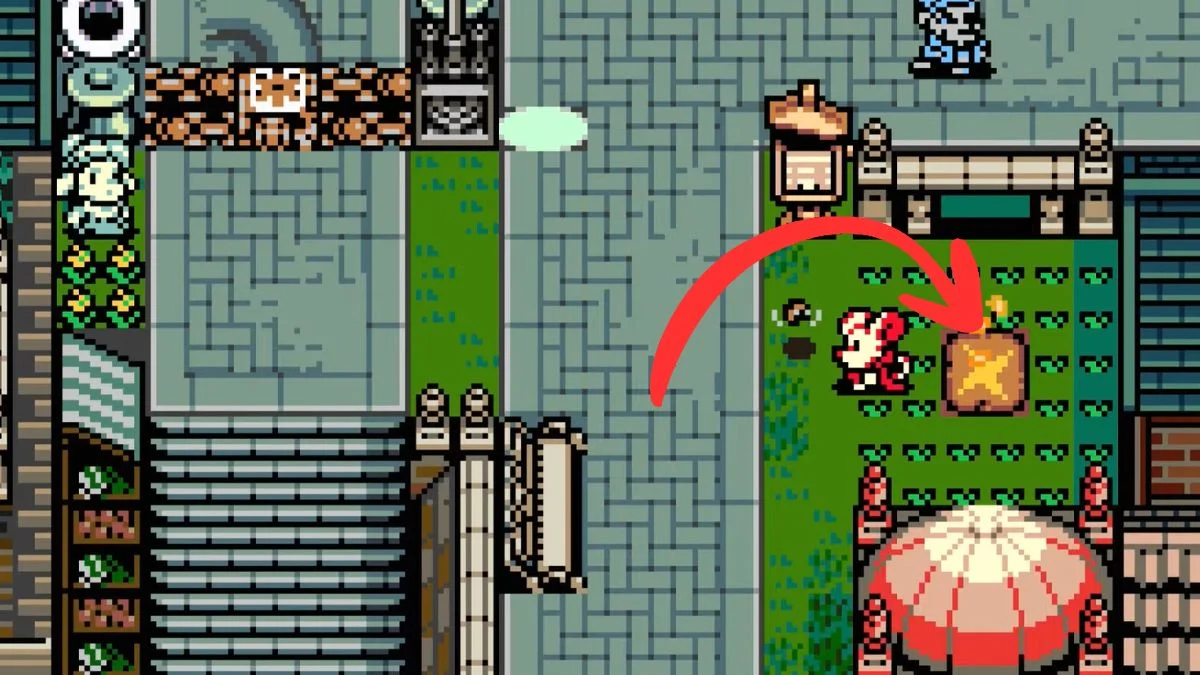
The primary way to lock in your progress reliably in Mina the Hollower is by interacting with burrow holes scattered across Tenebrous Isle. On top of that, the game autosaves frequently when you transition between screens or rooms, so your progress is generally better protected than it might first appear.

Here is how burrow holes work:
- Walking over a burrow hole triggers a quick save and updates your recent progress
- Burrowing into a hole creates a hard save, sets that location as your active checkpoint, and takes you into the Underlab
- A distinct audio cue plays when the save registers. If you do not hear it, the game has not saved
- A small save icon briefly appears in the bottom right of the screen each time a save triggers, which gives you a second confirmation to watch for
Spotting these holes is straightforward once you know what to look for. They appear as beige square tiles with a diagonal star pattern, and they emit a faint glow with what looks like fire rising from the top. Every time you drop into the Underlab through one of these holes, you lock in your progress and gain access to healing, vial refills, and Bone management tools at the same time.
The golden rule: activate every burrow hole you find, even if you are just passing through an area. There is no downside to saving early, and it will save you a lot of frustration further in.

Does Mina the Hollower Have Autosave?
Yes, and it is more active than many players expect. Mina the Hollower autosaves when you transition between screens or enter a new room, as well as when you reach major story beats or finish clearing an area. This means that simply walking through a door or crossing into a new section of the map can be enough to protect your recent progress.
Because of this, the risk of losing progress by quitting the game is generally lower than the save system’s minimal presentation suggests. However, the autosave does not cover everything. If you complete a side task, such as carrying a quest item to its destination, and quit before entering a new screen, that progress may not carry over when you reload.
The safest habit remains the same: hit a burrow hole or cross into a new room before ending your session.
What Happens When Mina Dies?
Death carries a real penalty in Mina the Hollower. When Mina falls, she respawns at the last burrow hole she activated. Returning to the Underlab also fully heals Mina and refills her vials, which makes reaching a checkpoint even more valuable before a tough section.
Key things to keep in mind:
- Dying with carried Bones puts them at risk
- You can recover lost Bones by returning to your last death location and collecting the blue Spark Orb
- A second death on the same recovery run can turn a recoverable loss into a permanent one
- The Underlab refills your health and vials each time you visit, so it functions as a full reset point, not just a save marker
Because of this, reaching a new burrow hole before tackling a difficult section is always the smarter play.

Mina the Hollower Save System Overview
| Feature | How It Works |
| Manual Save | Not available via menu |
| Quick Save | Walk over a burrow hole |
| Hard Save | Burrow into a hole and enter the Underlab |
| Screen Transition Autosave | Triggers when entering a new room or screen |
| Story Autosave | Triggers on major story beats and area completions |
| Save Confirmation | Audio cue and small save icon in the bottom right |
| Respawn Location | Last activated burrow hole |
| Underlab Benefits | Full heal, vial refill, Bone and Bonestone management |
Tips to Avoid Losing Progress in Mina the Hollower
- Activate every burrow hole immediately. Do not walk past one while carrying progress you cannot afford to lose
- Burrow into holes before boss rooms. This sets your checkpoint right before the hardest fights. You can also enable the Boss Checkpoints modifier in the options menu, which places an Underlab entrance directly before boss encounters
- Enter a new room or screen if you plan to quit soon. Screen transitions trigger autosaves, so crossing into a new area before closing the game is a reliable way to protect recent progress
- Return to the Underlab when your Bones are close to an upgrade. Spending them safely is better than gambling on one more room
- Complete side quests fully before quitting. Partial quest progress may not save properly if you exit before entering a new screen
- Watch for the save icon in the bottom right. That small icon is your clearest confirmation that a save has registered
Do Modifiers Affect the Save System in Mina the Hollower?
Mina the Hollower offers gameplay modifiers that adjust things like movement speed and burrowing speed, which can reduce the frustration of backtracking between checkpoints. The Boss Checkpoints modifier is particularly useful, as it adds an Underlab entrance right before every boss fight. However, enabling modifiers disables Feats, the game’s equivalent of achievements or trophies. The core save system itself remains unchanged regardless of which modifiers you use.

Bottom Line
Mina the Hollower keeps its save system intentional and old-school. Burrow holes are your most reliable tool for locking in progress, frequent screen-transition autosaves cover most of the gaps in between, and smart checkpoint management is what separates a clean run from a frustrating one. Find the holes, use them often, watch for the save icon, and listen for that audio cue. Once that habit clicks, the system feels less like a limitation and more like part of the game’s design.


Leave a Reply