

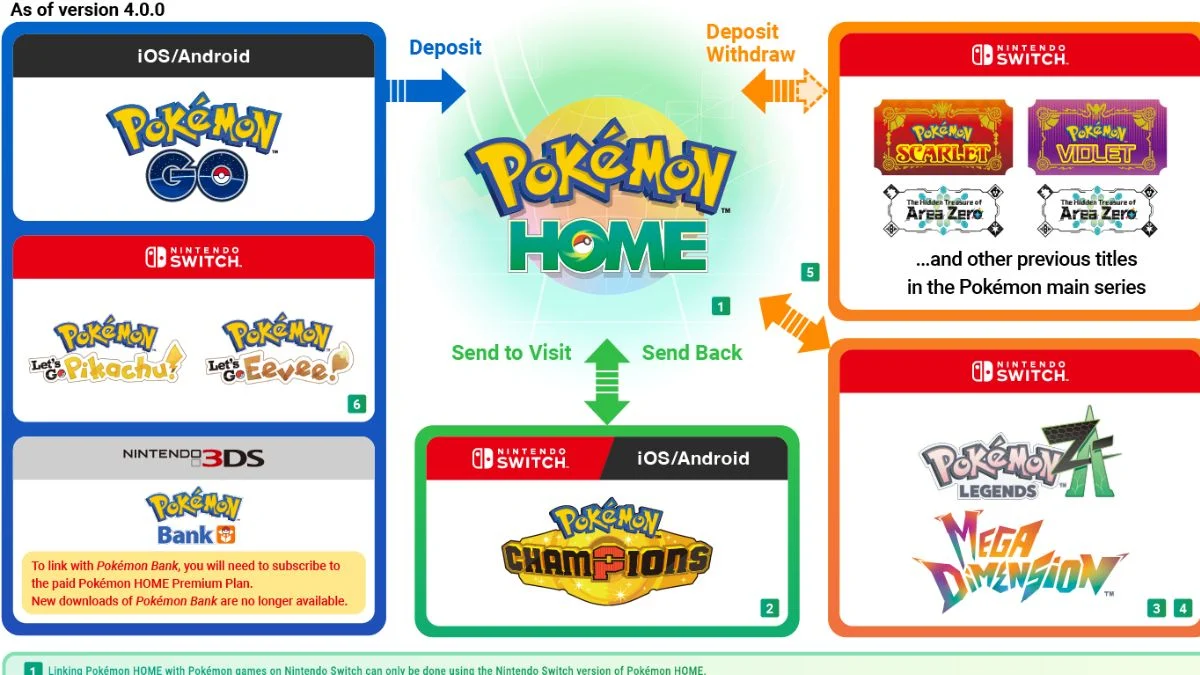
Pokémon Champions is now available as a free-to-start competitive battle game on Nintendo Switch and Switch 2, with a mobile version planned for later. While the game focuses on structured multiplayer battles, linking it with Pokémon HOME lets you bring Pokémon from across the series into the competitive arena.
This guide explains how to link Pokémon Champions to Pokémon HOME, how transfers actually work, and the key limitations you must understand before building your team.
Pokémon Champions Pokémon HOME: Overview

| Feature | Details |
| Release Date | Available now (April 2026) |
| Price | Free-to-start |
| Platforms | Nintendo Switch, Switch 2 (Mobile coming later) |
| Focus | Competitive multiplayer battles |
| HOME Integration | Supported with restrictions |

How to Link Pokémon Champions to Pokémon HOME
Setting up HOME correctly is essential before you attempt any transfers.
Step 1: Install Pokémon HOME
Download Pokémon HOME on:
- Nintendo Switch / Switch 2
- Android or iOS (optional)
Key clarification:
- Transfers to Pokémon Champions are handled on the Switch version
- The mobile app is mainly for trading and receiving Pokémon
Step 2: Use the Same Nintendo Account
- Sign in with the same Nintendo Account across:
- Pokémon HOME
- Pokémon games
- Pokémon Champions
Tip: If you use multiple accounts, double-check this step. Account mismatches are one of the most common issues.
Step 3: Complete Setup
- Launch HOME on Switch
- Finish the initial setup
- Optionally link the mobile version
How to Transfer Pokémon into Pokémon HOME
You must first move Pokémon into HOME before sending them to Champions.
From Nintendo Switch Games
Supported titles include:
- Pokémon Scarlet and Violet
- Pokémon Legends: Z-A
- Pokémon Legends: Arceus
- Pokémon Sword and Shield
- Pokémon Brilliant Diamond and Shining Pearl
- Pokémon: Let’s Go, Pikachu! and Eevee
Steps:
- Open HOME on Switch
- Select a game save file
- Move Pokémon into HOME boxes
From Pokémon GO (Important Flow)
Transfers from Pokémon GO follow a two-step path:
- Send Pokémon from Pokémon GO → HOME mobile app
- Then access them on the Switch version of HOME
Only after this can you move them into Pokémon Champions.
How to Send Pokémon to Pokémon Champions
This step happens inside the Switch version of Pokémon HOME.
Transfer Method (Clarified)
- Open Pokémon HOME on Switch
- Go to your HOME boxes
- Select Pokémon Champions as the destination
- Choose eligible Pokémon
- Send them as visitors
Once transferred:
- Pokémon will appear in Pokémon Champions with a “Visitor” tag or icon

Visitor System Explained (Most Important Rule)
This is the core mechanic you need to understand.
What Happens
- Pokémon sent from HOME become temporary visitors
- You can use them in battles
- You can return them to HOME anytime
What Does NOT Happen
- They do not become permanent team members
- Pokémon obtained inside Pokémon Champions cannot be sent to HOME
This creates a clear system:
- HOME → Champions (temporary access)
- Champions → HOME (not allowed for native Pokémon)
Capacity Limits and Storage
- You can have up to around 30 visiting Pokémon active at once
- There are capacity limits on active visitors
- There may also be overall storage limits for visiting Pokémon, though exact numbers are not officially confirmed
Locking Mechanic
- Visiting Pokémon become locked in HOME
- You cannot use them in other games until you return them
Eligibility and Move Restrictions
Supported Pokémon Only
- Only Pokémon available in Pokémon Champions can be transferred
- Unsupported Pokémon, forms, or certain legendaries cannot be used
Move Compatibility
- Moves not supported in Champions must be changed via Training
- Otherwise, the Pokémon cannot function properly in battles
Training and Progression Behavior
What Carries Over
- Training done in Champions:
- Is preserved when sent back to HOME
- Applies again when re-used in Champions
Important Note
- Training results may behave differently depending on the Pokémon and its form
Limited-Time Bonuses (HOME Connectivity)
Linking HOME with Champions also unlocks special rewards.
Confirmed Promotion
By transferring specific Pokémon from Pokémon Legends: Z-A through HOME into Champions, you can receive:
- Mega Stones for Chesnaught, Delphox, Greninja, and Eternal Flower Floette
Additional Mystery Gift rewards may be available for first-time transfers, depending on current events.
Quick Setup Flow
Follow this order to avoid errors:
- Install Pokémon HOME on Switch
- Log in with the correct Nintendo Account
- Transfer Pokémon into HOME
- Open HOME boxes
- Select Pokémon Champions as destination
- Send eligible Pokémon as visitors
- Adjust moves and training if needed
Why Linking Pokémon HOME Makes Sense?
Even with restrictions, HOME integration gives you a clear advantage:
- Access Pokémon from multiple games
- Test competitive builds instantly
- Unlock event rewards and bonuses
At the same time, Pokémon Champions still encourages:
- Daily recruitment
- Victory Points for permanent team building

Final Thoughts
Linking Pokémon Champions with Pokémon HOME is not a traditional transfer system. It is a controlled, competitive-focused feature built around balance.
You can bring powerful Pokémon into battle, but you must manage:
- Visitor-only access
- Move compatibility
- Training adjustments
If you understand these rules early, you can build stronger teams and avoid common mistakes that slow down your progress in competitive play.
For official confirmation and updates, refer to the The Pokémon Company connectivity announcement and official sites:
- Pokémon Champions: https://champions.pokemon.com/
- Pokémon HOME: https://home.pokemon.com/
- Connectivity news: https://www.pokemon.com/us/pokemon-news/connect-pokemon-home-with-pokemon-legends-z-a-and-pokemon-champions


Leave a Reply