

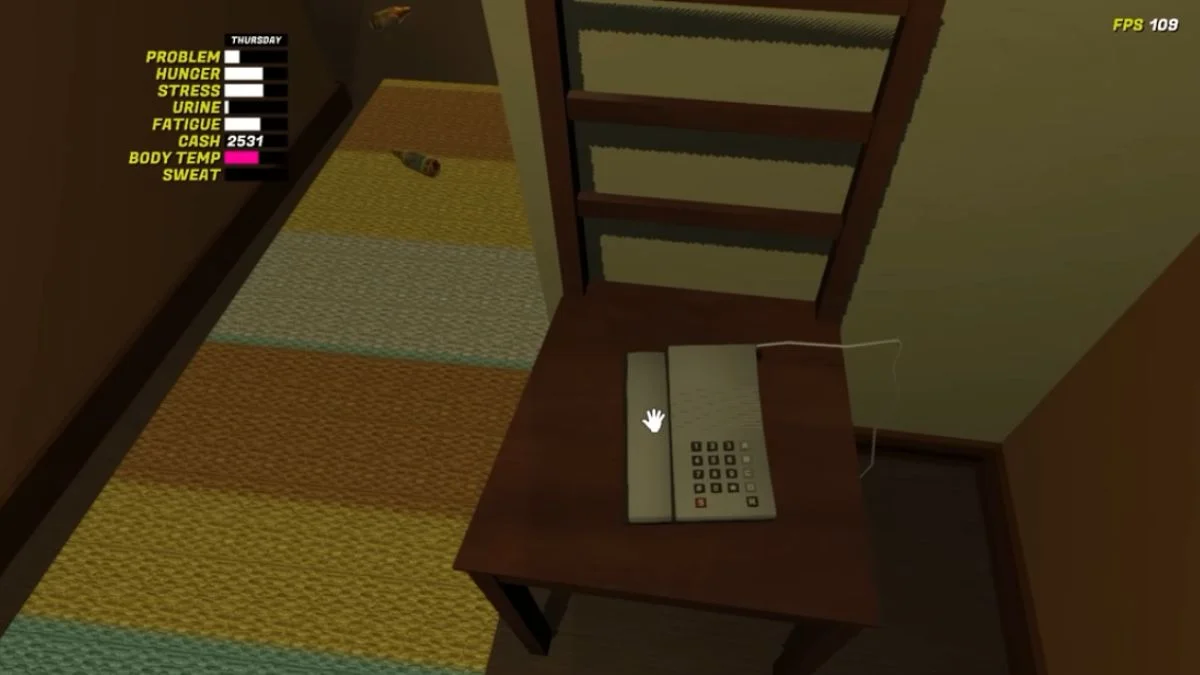
The phone in My Winter Car seems like a small object sitting in your apartment hallway, yet it most of the game progress relies on it. It helps you unlock jobs, buy parts, and speak to residents who influence the rhythm of Alivieska. While answering a call feels simple, calling someone yourself takes a little understanding. Many players pick up the phone, punch in digits, hear a few beeps, and assume the system broke.
This guide explains how the phone actually works and why dialing fails when it feels like you are doing everything right.
Where to Find the Phone
The phone rests on a chair inside your apartment hallway. You can pick it up at any time. When it rings, you simply interact with it. When you want to make your own call, you lift the handset and prepare to type the number. The phone stays available from your first day in the game, so you do not need to unlock anything before using it.
How to Dial a Number Correctly
Pick up the phone first
You must hold the handset before typing. If you try to enter numbers before grabbing the phone, nothing registers. Once you pick it up, the phone waits for input.
Use a continuous sequence of digits
The phone expects you to enter the entire number without hesitation. If you pause, the game assumes that you finished dialing and it attempts to connect to whatever you entered. A slight break can turn a correct number into an invalid one.
Use the numpad when possible
The number pad on the right side of your keyboard works best for dialing. Some players report that the top row of numbers also works, though the numpad feels more reliable and quicker. If you use a keyboard without a numpad, you can still dial, but you might notice a slight delay before the connection begins.
Wait for the caller to answer
Once the number finishes dialing, wait a few seconds. The phone may feel silent at first, but the game often takes a moment before the call connects. If the line stays quiet, the person you called may be unavailable due to time of day. Shops and residents follow their own schedules, so calling at night often leads to unanswered lines.

How to Avoid Cutting Off the Call
Once the call connects, let the character on the other end speak until they finish. Some game events and job offers depend on the full call playing out. If you hang up early, the event may fail to trigger. You can safely put the phone down only after the character ends the conversation.
What the Phone Is Used For
Taking on early jobs
The taxi rank becomes one of your first sources of income. Calling them unlocks the taxi driving path and gives you a steady stream of early money to invest into your car.
Responding to ads
The local newspaper lists phone numbers for people selling parts, upgrades, or even entire vehicles. Calling these numbers helps you expand your build. These ads change and may become key to finding certain items.
Triggering world events
Some residents call you with updates, requests, or pranks. Calling them back or contacting others at the right time helps you progress. Each call contributes to the world feeling grounded and reactive.
Common Mistakes When Dialing
Players often struggle because they:
• Try to dial before picking up the phone.
• Pause between digits.
• Use the wrong keys without noticing.
• Call businesses during closed hours.
• Hang up before the caller finishes.
Once you understand how the phone wants you to dial, the whole system feels predictable.
More Trending Gaming Guides & News:


Leave a Reply