

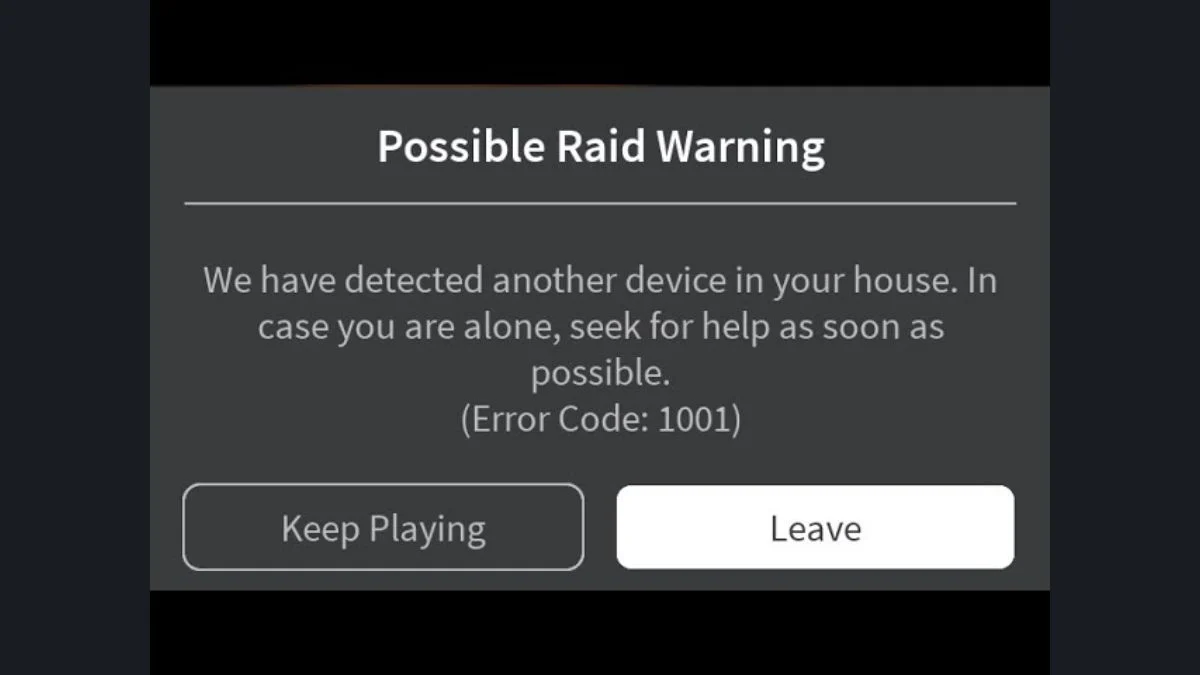
If you have been playing Roblox horror games lately and suddenly received a message saying “Possible Raid Warning: We have detected another device in your house,” you are not alone. This message has been scaring players across the globe for years, and the panic it causes is completely understandable. However, the truth behind Roblox Error Code 1001 is far less sinister than it appears, and this guide breaks down exactly what it is, where it comes from, and why you have nothing to worry about.
What Is the Roblox Error Code 1001 Possible Raid Warning?
The message associated with Roblox Error Code 1001 typically reads:
“Possible Raid Warning. We have detected another device in your house. In case you are alone, seek for help as soon as possible.”
Some earlier versions of the message went even further by urging players to call 911 or contact emergency services. The message usually presents two options: keep playing or leave the game. Its design closely mimics an official Roblox system notification, which is exactly why it catches so many players off guard.
However, Roblox Error Code 1001 is not a real Roblox error. The platform has never officially acknowledged this code, and it does not come from Roblox itself in any way.

Where Does the Error Code 1001 Message Come From?
The message originates from a Roblox horror experience called Start Survey (also referred to as “The Survey” in some communities). The developer of this game built a fake error notification designed to look like an official Roblox message, with the sole purpose of scaring players into leaving the game. It is a deliberate horror mechanic, not a system alert.
From there, the message spread rapidly across social media platforms, particularly TikTok, where content creators began sharing it as if it were a genuine Roblox security warning. This amplified the confusion significantly, with many players genuinely believing their safety was at risk.
The message has since appeared in other Roblox horror games as well, as developers began replicating the mechanic for similar scare purposes.
How to Tell If a Roblox Error Message Is Fake
Knowing the difference between a legitimate Roblox notification and a developer-created fake one is straightforward once you know what to look for.
| Signal | Real Roblox Error | Fake Developer Error |
| Roblox topbar blurs | Yes, always | No |
| Official code format | Three digits | Error 1001 uses four digits |
| Grammar and language | Professional and clear | Often contains errors |
| Asks you to call emergency services | Never | Some versions do |
| Officially acknowledged by Roblox | Yes | No |
Key rule: If the Roblox topbar does not blur when a message appears, the message is fake. Legitimate Roblox system errors always blur the interface around them. A developer-created message will not replicate this behaviour.
Additionally, Roblox error codes follow a three-digit format. A four-digit code like 1001 falls outside that format entirely, which is another immediate indicator that something is not right.
Can Roblox Developers Actually Monitor Your Devices?
No. There is no way for a Roblox game developer to detect other active devices on your home network. Developers do not have access to your network data, household devices, or anything beyond the information your Roblox account provides in-game. The claim that another device has been detected in your house is technically impossible for any Roblox experience to make.
What developers can do is create custom kick messages using Roblox’s scripting system, and that is exactly what the creators of these horror games have done. They use a Player:Kick function with a custom message designed to look like an official alert. The result looks convincing to players who are not familiar with how Roblox error screens actually appear.

Was Error Code 1001 Ever a Real Roblox Error?
No. Some content creators on TikTok have claimed that Error Code 1001 existed in an early version of Roblox around 2013 and was later deleted. However, Roblox has never confirmed this, and there is no verified evidence that it ever existed as a legitimate system error. The claim appears to be part of the same wave of misinformation that made the fake message spread in the first place.
What Should You Do If You See This Message?
If the Error Code 1001 Possible Raid Warning appears while you are playing a Roblox horror game, here is what to keep in mind:
- Stay calm. The message is a scripted part of the game experience, not a real security alert
- Check the topbar. If the Roblox interface around the message is not blurred, the message is fake
- Do not call emergency services. Roblox will never instruct a player to contact 911 or any equivalent emergency number
- Continue or leave the game based on your own comfort. The message has no effect on your account or device
- Report the game if you feel the content is misleading or distressing, through Roblox’s standard reporting tools
What Are Real Roblox Error Codes?
For reference, genuine Roblox error codes that players do encounter include errors such as Error Code 277, Error Code 267, Error Code 279, Error Code 403, and Error Code 529. These are officially documented, follow the three-digit format, and come with real troubleshooting solutions. If you encounter any of these, Roblox support and community forums provide verified fixes.
Error Code 1001 does not belong to this list and never has.

Final Verdict: Is Roblox Error Code 1001 Real?
No, it is completely fake. Error Code 1001 is a developer-created scare tactic built into specific Roblox horror experiences. Roblox has never acknowledged it, the message format does not match official Roblox errors, and the technology required to actually detect other devices on your network does not exist within the Roblox platform. It is a clever piece of in-game horror design that found a much wider audience than its creators likely intended.
If you see it, the best thing to do is appreciate the creativity behind it and move on.


Leave a Reply