

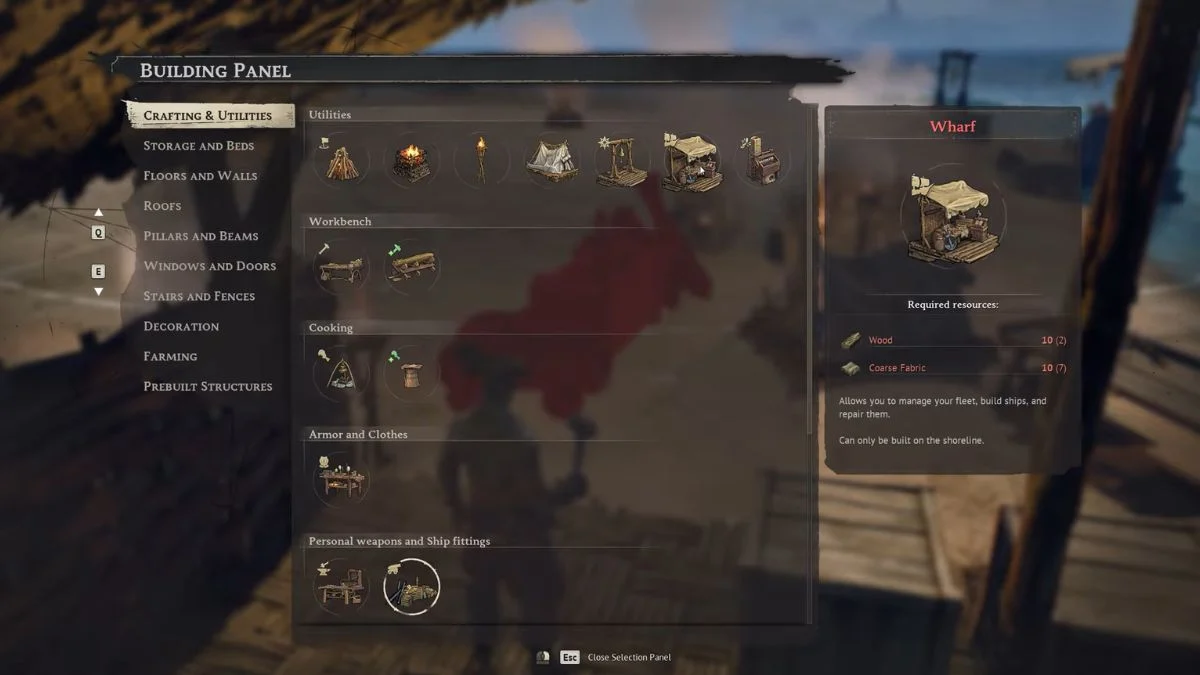
The Wharf is one of the most important structures you will build in Windrose, and without it, you cannot equip cannons, upgrade your ship, or build new vessels. The catch is that it does not appear in your build menu from the start. You need to work through a specific chain of main quests before it unlocks, and a lot of players get stuck wondering why it simply is not showing up. This guide walks you through every step, from the prerequisite quests to placing the Wharf correctly, so you can get your ship battle-ready as quickly as possible.
What Is the Wharf and Why Do You Need It?
The Wharf is a coastal utility structure that serves as your ship management hub. You need it to equip cannons and hull upgrades to your ship, manage cargo, customise your ship’s sails and flags, rename your vessel, and build entirely new ships through the Shipyard menu. Without a Wharf, none of that is possible, even if you have already crafted the gear at your Shipwright’s Workshop.

Prerequisites: What You Need to Do First
The Wharf blueprint does not unlock automatically. You need to complete the following steps in order:
| Requirement | Details |
| Complete Main Quest | “I Need a Bigger Boat” |
| Complete Main Quest | “Rescuing the Crew” |
| Accept the Seafarer Quest | Unlocks after completing the above two |
| Build a Shipwright’s Workshop | Costs 15 Wood, 10 Coarse Fabric, 5 Copper Ingots |
| Add a Roof Over the Workshop | The Workshop will not function without a roof |
| Craft at least one 12-Pounder Cannon | This is the trigger that adds the Wharf to your build menu |
Once you craft the 12-Pounder Cannon at the roofed Shipwright’s Workshop, the game silently adds the Wharf blueprint to your Building menu. There is no announcement or notification, so many players miss it.
Step-by-Step: How to Unlock the Wharf
Step 1: Complete “I Need a Bigger Boat” and “Rescuing the Crew”
Both of these are Main Quests that run in parallel early in the game. “I Need a Bigger Boat” rewards you with a larger ship, which requires 100 Wood, 20 Nails, 20 Coarse Fiber, and 10 Rope to repair once you locate it. “Rescuing the Crew” requires you to sail to five locations and free seven crew members from pirate camps. Once all seven are rescued, the crew tows the ship back to your base.
Step 2: Accept the Seafarer Quest
The Seafarer questline becomes available immediately after completing “I Need a Bigger Boat.” This is the questline that introduces ship combat and, in turn, requires you to build the Wharf.
Step 3: Build the Shipwright’s Workshop
You need to construct a Shipwright’s Workshop using:
- 15 Wood
- 10 Coarse Fabric
- 5 Copper Ingots
Importantly, you must also build a roof directly over the Workshop or construct it under an existing roof. The Workshop cannot be used without overhead cover, and this trips up a lot of players.

Step 4: Craft a 12-Pounder Cannon
Interact with the Shipwright’s Workshop and craft at least one 12-Pounder Cannon. This specific action triggers the Wharf to unlock in your Building menu. Some players have also found that crafting hull upgrades or ship repair kits can help progress the unlock if the Cannon alone does not do it, so it is worth trying those as well if the Wharf still does not appear.
How to Build the Wharf
Once the Wharf blueprint unlocks, here is how to build it:
Materials needed:
- 10 Wood
- 10 Coarse Fabric
Steps:
- Press B to open the Build Menu
- Navigate to the Crafting and Utilities tab
- Select the Utilities sub-menu
- Find the Wharf blueprint, located right next to the Fast Travel Bell
- Place it along the coastline, directly in the water near the shore
The placement rule is essential. The Wharf must be placed in the water along the coast to function. It will not work if placed inland or away from the shore. A good tip from the community is that the Wharf fits flush with pier pieces, so if you remove a pier section and slot the Wharf in its place, you avoid having an awkward elevated step up to the structure.
How to Use the Wharf
Once built, jump onto the Wharf platform and interact with the table using E. You will see two main menus:
Ship Selection
This menu shows all your owned ships. For any ship docked nearby, select it and choose Manage Ship to access two tabs:
- Cargo and Gear: Drag and drop ship upgrades such as 12-Pounder Cannons, hull bracing, and Combat Repair Kits into the ship’s gear slots. Note that you can only equip ship gear at the Wharf, not upgrade it. Upgrades happen at the Shipwright’s Workshop
- Customisation: Change your ship’s sails, flags, and name from this tab
You can also repair ships that are damaged through the Ship Selection menu.
Shipyard
The Shipyard tab is where you build new ships from scratch, provided you have the required materials. For example, the Blackbeard Ketch variant requires 100 Nails, 150 Wood, 30 Rope, and 40 Coarse Fabric. New ships unlock as you progress the story and build standing with the four Factions in the game.
The Wharf Is Not Showing Up: How to Fix It
Several players have reported the Wharf not appearing in the build menu even after completing the listed quests. Here is what to try:
- Confirm both main quests show as complete in your quest log, specifically “I Need a Bigger Boat” and “Rescuing the Crew”
- Make sure your Shipwright’s Workshop has a roof over it, as the Workshop cannot be used without one
- Try crafting additional items at the Shipwright’s Workshop beyond just the cannon, including hull upgrades and ship repair kits, as some players found this pushed the unlock through
- Verify your game files through Steam if none of the above works, as corrupted files can prevent progression triggers from firing
- If the issue persists, submit a bug report through the in-game menu or contact the developers through the official Windrose Discord for a faster response

Quick Reference Summary
| Step | Action | Cost |
| Prerequisite quests | Complete “I Need a Bigger Boat” and “Rescuing the Crew” | None |
| Seafarer questline | Accept after completing prerequisites | None |
| Shipwright’s Workshop | Build with roof overhead | 15 Wood, 10 Coarse Fabric, 5 Copper Ingots |
| Unlock trigger | Craft a 12-Pounder Cannon at the Workshop | Materials required |
| Build the Wharf | Place along the coastline in the water | 10 Wood, 10 Coarse Fabric |
| Access Wharf | Interact with the table on the platform | Press E |


Leave a Reply