


Control Resonant does not make you pick Easy, Normal, or Hard and then lock you into that choice. Instead, Remedy gives players a much more flexible system through Assist Mode, letting you fine-tune individual parts of combat.
That means you can make enemies less aggressive without changing your own damage, widen the Perfect Dodge Window without touching enemy health, slow down incoming projectiles, speed up Dylan’s ability recovery, or even push certain settings in the opposite direction for a tougher challenge.
The best part? You can change Assist Mode during an existing playthrough, and using it does not stop you from earning trophies or achievements.
How Assist Mode works in Control Resonant
The biggest thing to understand about Control Resonant is that there are no traditional difficulty levels.
Instead of selecting Easy, Medium, or Hard at the start, you get individual combat variables through Assist Mode. Remedy Lead Gameplay Designer Sergey Mohov explained that the goal was to let players adjust specific gameplay problems rather than changing the entire combat balance with one broad difficulty setting.
That matters because Control Resonant introduces a close-range combat system built around Dylan Faden’s abilities and the shifting combat forms of the Aberrant. The opening section can therefore feel quite different from the original Control, especially while players are learning the new combat rhythm.
The official Help Center recommends experiencing the default setup first so players can understand the intended combat flow before changing multiple settings. But there is no permanent commitment here. Assist Mode can be opened whenever needed, allowing you to modify individual mechanics as you progress.
So, rather than thinking about Assist Mode as simply an “easy mode,” think of it as a toolbox for reshaping combat.
More Puzzle Guides: Two separate blood-compatibility stages test whether you’re tracking the right patients and the right positions. For more, check out our full walkthrough of the Silent Hill: Townfall Blood Transfusion Puzzle Solution.
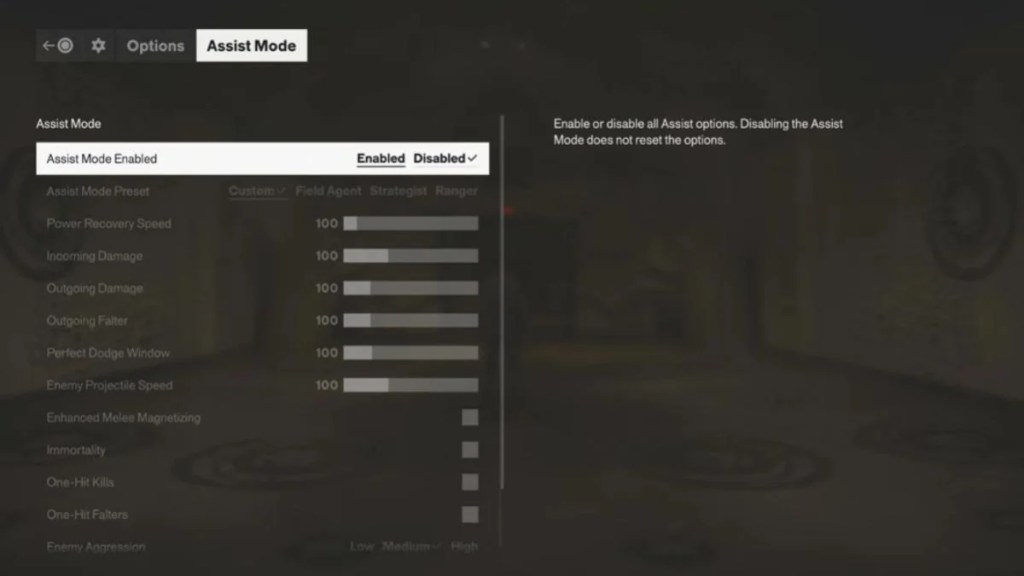
Every Assist Mode setting explained
This is where things get seriously interesting. Control Resonant gives you control over a surprisingly large number of combat variables.
Enemy Aggression
Enemy Aggression determines how aggressively enemies behave during encounters.
Getting surrounded or attacked from several directions can make certain fights overwhelming. Lowering this setting can reduce that pressure without automatically changing Dylan’s damage output.
Want the opposite experience? You can increase enemy aggression to make encounters more demanding.
Perfect Dodge Window
Having trouble hitting the timing for a Perfect Dodge?
The Perfect Dodge Window lets you control how forgiving that timing is.
Widening the window gives you more time to perform a successful Perfect Dodge. Reducing it makes the timing stricter for players looking for an additional challenge.
More Dawnwalker Guides: A repeating nightmare hides two wildly different outcomes, and only one manual save protects you from missing either. For more, read our complete walkthrough of Escaping the Dream and Unlocking Together Forever in Home Sweet Home.
Enemy Projectile Speed
Some attacks are simply easier to deal with when you have more time to see them coming.
Enemy Projectile Speed controls how quickly enemy projectiles travel. Lowering the speed gives you more time to read incoming attacks, while increasing it creates a faster reaction test.
Incoming Damage
This one is straightforward: Incoming Damage controls how much damage Dylan receives.
Reduce it when surviving encounters is the main problem, or increase it when you want enemies to punish mistakes more heavily.
Outgoing Damage
Outgoing Damage controls how much damage Dylan deals.
Because Incoming Damage and Outgoing Damage are separate settings, you can create a custom combination rather than simply making everything easier or harder at once.
Outgoing Falter
Damage is not the only thing that matters during combat.
Outgoing Falter determines how quickly Dylan can break an enemy’s posture. This gives players another way to change how quickly enemies become vulnerable without simply altering their health or Dylan’s overall damage.
Power Recovery Speed
Dylan’s supernatural abilities are a major part of the combat system, and Power Recovery Speed determines how quickly his power recovers.
Finding yourself waiting too long for abilities to become available during hectic fights? Increasing this setting can reduce that downtime.
Enhanced Melee Magnetizing
Close-range combat can get chaotic fast.
Enhanced Melee Magnetizing provides additional assistance with positioning during melee attacks, making it easier to maintain the correct position while fights are moving quickly.
Immortality
Things can get even more forgiving with Immortality.
When enabled, Dylan cannot be defeated, giving players a direct way to remove survival as the primary obstacle during combat.
One-Hit Kills
One-Hit Kills does exactly what the name suggests: enemies can be defeated with a single hit.
It is a much more substantial adjustment than simply tweaking outgoing damage and can be used when players want to bypass certain combat barriers altogether.
One-Hit Falters
One-Hit Falters works around enemy posture.
With the option enabled, enemy posture can be broken with a single hit, providing another way to dramatically change the flow of encounters.
More Dawnwalker Puzzles: A vampire-twisted riddle flips your instincts on their head — the scariest-sounding option turns out to be the safe one. For more, check out our full breakdown of the Odd Riddle Solution in The Blood of Dawnwalker’s Lunar Game.
Assist Mode can make the game harder too
Here’s the part that makes Control Resonant’s system particularly interesting: Assist Mode isn’t exclusively designed to make combat easier.
Remedy changed the philosophy behind the system compared with the original Control. Players can push several settings upward or make their timing windows more demanding.
You can increase Enemy Aggression, reduce the Perfect Dodge Window, and increase Incoming Damage to create a more punishing experience.
The official Steam announcement also highlights this two-way approach, explaining that Assist Mode can be used to make the game more demanding by increasing enemy aggression, reducing the Perfect Dodge Window, and increasing Incoming Damage.
Remedy has described the philosophy as giving players control over the game’s “friction.” Instead of forcing everyone through exactly the same difficulty curve, the system lets players decide which parts of combat should provide more or less resistance.
Assist Mode presets are available
Don’t want to spend ages tweaking every slider?
No problem.
Control Resonant includes Assist Mode presets that provide starting points for different approaches to the game.
You can begin with a preset and then modify individual settings afterward. The presets aren’t permanent packages that lock you into one configuration. Players can continue adjusting specific mechanics whenever they want.
That makes the system much easier to approach for anyone who doesn’t immediately know which individual settings they need.
You can change difficulty settings during your playthrough
One of the most useful features is that Assist Mode isn’t a decision you have to make before starting the game.
According to Remedy’s official support information, Assist Mode can be enabled or disabled during gameplay, with its settings changed whenever necessary.
So you can start with the default experience, learn how Dylan’s combat and movement work, and then make targeted changes when something starts getting in the way.
For example, struggling with enemy numbers doesn’t necessarily mean you need more damage. Having trouble with reaction timing doesn’t necessarily mean enemies need less health.
You can address those problems separately.
That granular control is the entire point.
Assist Mode does not disable trophies or achievements
Players also don’t have to worry about Assist Mode locking them out of progression rewards.
Remedy explicitly states that using Assist Mode does not prevent players from earning trophies or achievements.
That means players can experiment with different settings without having to choose between accessibility options and their trophy or achievement progress.
The underlying philosophy is simple: when a particular part of the game becomes a barrier, players can change the rules and continue playing rather than being forced to abandon the experience.
Control Resonant’s launch hotfix also changed combat balance
There’s another update worth knowing about before diving into difficulty settings.
Control Resonant received launch hotfix 1.3.3 on September 24, with Remedy responding to early player feedback and its own observations of the final game.
The studio said the update addressed several combat concerns, including enemy health pools feeling too high, enemies requiring too many hits to reach the Falter threshold needed for executions, and Dylan not feeling powerful enough during the early part of the game.
The hotfix reduced the base health and required Falter level of most enemies, along with those of the Dancer and Deserter bosses.
It also increased Dylan’s maximum Aberrant Strength and Ability Strength as he progresses.
That means older pre-release discussions about Control Resonant’s combat difficulty don’t necessarily describe the current launch balance. The base combat experience has already been adjusted, while Assist Mode remains available for players who want even more control.
Remedy said:
“We strongly believe these changes will improve the gameplay feel and flow while still providing a challenge.”
The studio also said it would continue monitoring player feedback and could make additional adjustments in the future.
Control Resonant has more accessibility options beyond Assist Mode
Assist Mode is only one piece of the game’s accessibility setup.
Control Resonant also includes options covering controls, graphics, audio, interface, and movement comfort.
Players can remap controls for both controller and mouse and keyboard. Certain actions can also be switched between hold and toggle behavior, while camera and input settings provide additional customization.
On the graphics side, players can disable effects including:
- Motion blur
- Depth of field
- Lens distortion
- Film grain
- Vignetting
Audio options include separate volume controls and a Hyperacusis Filter.
The interface can also be customized, including subtitles, speaker names, HUD elements, and color-blind interface settings.
There is even a movement-focused option called Shift Tunneling, which is designed to reduce the effects associated with rapid movement during Shift.
So the accessibility system goes well beyond simply changing how much damage enemies deal.
More Townfall Puzzles: A blurry, zoomed-in CRTV sequence hides four posters scattered around the pharmacy, each holding one digit of the lock. For more, read our complete guide to Cracking the Silent Hill: Townfall Pharmacy Locker Code
How should you set your Control Resonant difficulty?
There isn’t one universal setup that every player needs.
The real advantage of Control Resonant is being able to identify the specific mechanic causing problems and adjust that mechanic instead of changing the entire game.
Enemies overwhelming you? Try changing Enemy Aggression.
Perfect Dodges too difficult? Increase the Perfect Dodge Window.
Projectiles moving too quickly? Reduce Enemy Projectile Speed.
Taking too much damage? Adjust Incoming Damage.
Need abilities more often? Increase Power Recovery Speed.
Want more challenge? Push the relevant settings in the opposite direction.
And for players who want to remove major combat barriers altogether, options such as Immortality, One-Hit Kills, and One-Hit Falters are available.
With the September 24 launch hotfix also addressing early combat balance, players now have an adjusted base experience alongside a detailed system for customizing the challenge further.
Rather than asking you to decide how difficult the entire game should be, Control Resonant lets you decide which individual parts of combat should challenge you.
Control Resonant is available now on PC, PlayStation 5, and Xbox Series X|S.
Image Credits:
- Featured Image: Remedy Entertainment
- Image Credit 2: Remedy Entertainment


Leave a Reply