

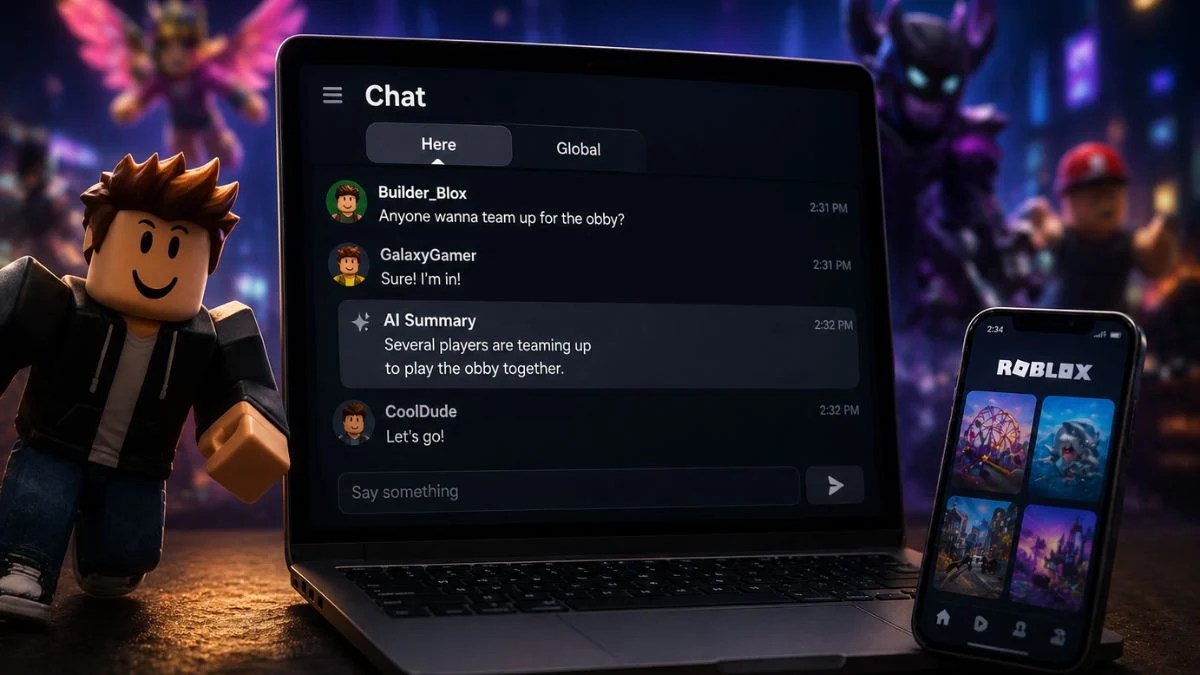
Roblox is currently testing two significant chat updates that are already changing how players communicate across the platform. If you have noticed AI-generated summaries appearing in your chat window or spotted new “Here” and “Global” tabs, you are not alone. Roblox officially confirmed both features are in a phased test rollout, starting with a limited group of players before expanding gradually ahead of a full global release. Here is a complete breakdown of what each feature does, how it works, and what it means for players, parents, and creators.
Why Is Roblox Introducing These Changes?
The motivation behind both updates is straightforward. Roblox stated that the goal is to reduce the frustration caused by blocked chat while still maintaining safety, particularly for younger players. The old system showed a lock icon and “…” whenever messages between different age groups were blocked, which cut conversations off entirely and broke the flow of gameplay. The new Chat Summary feature aims to keep those conversations going in a moderated, age-safe way rather than shutting them down completely.

What Is the Roblox Chat Summary Feature?
The Chat Summary feature replaces the familiar lock icon and “…” that used to appear when chat between different age groups got blocked. Instead of seeing a dead end in the conversation, players now see a safe, AI-generated summary of what was said, marked clearly with an AI summary icon so it is easy to tell apart from actual player messages.
Roblox describes the goal as keeping the in-game conversation flowing without compromising on safety. Rather than cutting the chat off entirely, the system generates a high-level version of the exchange that all users can follow.
It is also worth noting that these updates affect text chat only. Voice chat operates under separate age restrictions and its own moderation system, and the new features do not change how voice chat works.
Who Can See Chat Summaries?
This is an important detail for parents and players to understand:
- All users can see Chat Summaries, including those who have not completed an age check
- However, you must complete an age check to send messages in chat
- Summaries pass through Roblox’s existing Text Chat filter, the same system that screens all in-game messages
- Any message that violates Roblox’s Community Standards gets blocked and will not be included in a summary
- Summaries also appear alongside real-time chat rephrasing for profanity between age-checked users in similar age groups or trusted friends
Can You Opt Out of Chat Summaries?
Currently, no opt-out option exists during the test phase. Users cannot choose to stop their messages from being summarised, nor can they disable summaries from appearing in their view. However, Roblox has confirmed it is actively building an opt-out toggle and expects to launch it shortly after the feature moves out of testing and into its full global release.
Creators also cannot turn off Chat Summaries within their games during the test period. The feature is a system-level update, meaning it requires no API changes or manual setup from developers.

What Is Roblox Cross-Server Chat?
Alongside Chat Summaries, Roblox is also testing Cross-Server Chat, which adds two new tabs to the chat window:
- “Here” tab shows your local server chat, exactly as it always has
- “Global” tab connects you to a broader pool of around 200 players across multiple servers who are playing the same game
Players never need to leave their current session or lose progress to use the Global tab. Roblox automatically matches players in the global pool based on language, locale, and age, so only users in similar age groups can communicate with each other.
To prevent spam, Roblox has also placed limits on how many messages can be sent and received. If those limits are reached, messages are automatically dropped rather than delivered.
Key Details at a Glance
| Feature | Detail |
| Chat Summaries | AI-generated, replaces blocked chat with safe summaries |
| Who Can See Summaries | All users, including those without age checks |
| Who Can Send Messages | Age-checked users only |
| Opt-Out Available Now | No, toggle coming soon after full launch |
| Voice Chat Affected | No, these changes apply to text chat only |
| Cross-Server Chat | Connects players across servers via “Here” and “Global” tabs |
| Global Pool Size | Around 200 players per global chat group (test phase) |
| Matching System | Based on language, locale, and age group |
| API Changes Required | None |
| Creator Control (Test Phase) | Cannot be disabled |
| Creator Control (After Full Release) | Opt-out available via Creator Hub |
Is the Chat Summary Feature Safe?
Roblox has built several layers of protection into Chat Summaries specifically to address safety concerns:
All summaries pass through the same Text Chat filter that screens regular in-game chat. This means the AI cannot generate a summary that contains content which would otherwise be blocked.
Violating messages are not summarised at all. If the original chat breaks Community Standards, it gets blocked before the summary stage and never reaches other players in any form.
Age-based matching applies to Cross-Server Chat, meaning younger players are only grouped with others in similar age brackets. This directly addresses concerns around unwanted contact between children and adults.
However, it is worth noting that child safety experts and parents have raised broader concerns about Roblox’s age estimation system in general. According to Roblox’s chief safety officer, the platform’s facial analysis system estimates age within approximately 1.4 years for users under 18, and the company acknowledges that errors can occur. Roblox says parents can reset age checks, submit appeals, or use ID verification to correct any misclassification.

What Should Parents Know?
For parents specifically, it is important to be aware that existing parental controls remain fully in place alongside these new features. Parents can still:
- Restrict who can chat with their child
- Limit who can send direct messages to their child
- Turn off chat access entirely through account settings
- Block direct messages and manage contact permissions until a child turns 16
These controls are accessible through Roblox’s Parental Controls section and are not affected by the Chat Summary or Cross-Server Chat tests.
What Do Existing Safety Features Look Like on Roblox?
For context, Roblox’s existing chat safety system already includes the following protections:
- Filtered chat blocks inappropriate content including discriminatory speech, bullying, extremism, violence, and sexual content
- Personal information is automatically blocked from being shared in chat
- Messages with profanity are automatically rephrased into safe alternatives
- Players aged 12 and under have stricter filters applied to both posts and chat
- Restricted experiences with strong language or voice chat require users to complete an age check before accessing them
- Account owners can limit who can chat with them, message them, or follow them into experiences
What Does This Mean for Creators?
Roblox confirmed that both features are system-level updates requiring no action from developers. There are no API changes, no new implementation needed, and no settings to configure during the test phase.
Once Cross-Server Chat exits testing and moves into its full release, creators will gain the ability to opt out of the Global tab through Creator Hub. Roblox has also indicated plans to eventually allow creators to customise cross-server channels to suit the specific needs of their individual games.

What Happens Next?
Both features are currently in a phased rollout starting with a limited group of players, expanding gradually throughout the week before a full global release. Roblox has confirmed it will publish more comprehensive documentation as the rollout progresses. The opt-out toggle for Chat Summaries is also in development and expected to go live shortly after the full launch. Any issues during the test phase can be reported directly on the Roblox Developer Forum.


Leave a Reply