

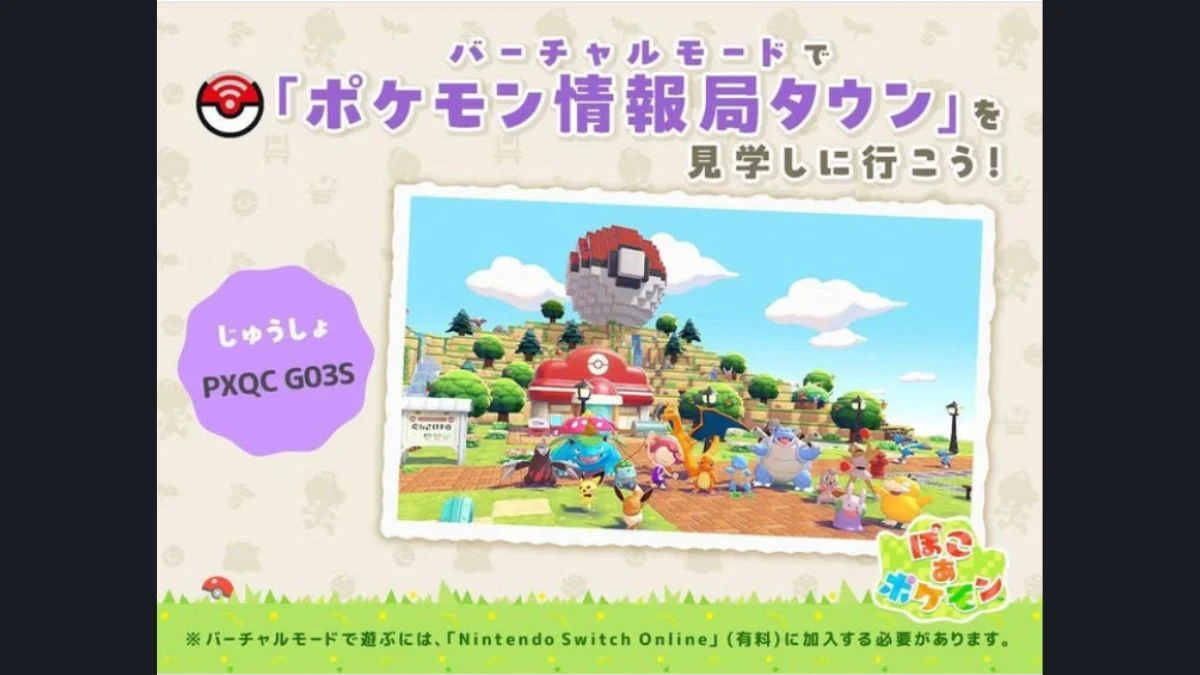
The developers of Pokémon Pokopia built their own Cloud Island and made it available for everyone to explore, and it is genuinely worth your time. Packed with elaborate builds, rare furniture, and hidden secrets from the minds at Game Freak and Omega Force, the Developer Island doubles as both a sightseeing spot and a practical shortcut for filling out your Habitat Dex. However, entering the code into a regular PC will not get you there. Here is exactly how it works.
Pokémon Pokopia Official Public Cloud Island Codes
There are currently two official public Cloud Island codes available in Pokémon Pokopia:
| Island | Code |
| Pokémon Developer Island (Game Freak / Pokémon Co.) | PXQC G03S |
| Ad Team Island (Hidetaka Kano, star of the Japanese commercials) | QBRK 7FVM |
Both islands are view-only and contain late-game items and Pokémon, so be aware of potential spoilers before visiting. The Ad Team Island features completely different builds from the Developer Island and is equally worth photographing for use with the 3D Printer.

What You Need Before Visiting
Before entering any Developer Island code, make sure you have the following:
- An active Nintendo Switch Online subscription (required for all Cloud Island access)
- The Mysterious Goggles item, purchased from the PC Shop at any Pokémon Center using Life Coins (the cost is a very small amount, under 500 Life Coins)
- The Mysterious Goggles become available in the PC Shop once you reach Environment Level 3
How to Access the Developer Island Step by Step

Entering the code directly into the Pokémon Center PC will give you an error message stating the island is not currently public. That is because Developer Islands run in a view-only virtual mode, which requires the Mysterious Goggles to access. Here is how to get there:
- Step 1 — Purchase the Mysterious Goggles from the PC Shop at any Pokémon Center using Life Coins. They unlock at Environment Level 3.
- Step 2 — Open your inventory and equip the Mysterious Goggles.
- Step 3 — A new screen will appear prompting you to enter a code.
- Step 4 — Type in PXQC G03S for the main Pokémon Developer Island, or QBRK 7FVM for the Ad Team Island.
- Step 5 — You will be transported directly to the island, where you can explore freely at your own pace.
- Step 6 — When you are ready to leave, open the Pokédex menu with the + button, then press the – button to return home. Alternatively, you can interact with the Pokémon Center PC on the Cloud Island itself.

There is no daily visit limit on either island. You can revisit the same code as many times as you want.
What You Can Do on the Developer Island
Once you arrive, the island is yours to explore. However, keep in mind that while visiting any Cloud Island in view-only mode, you cannot interact with items, trees, or the environment. You can only walk around and observe what has been built. Here is what makes the visit worthwhile:
Explore the Builds
The Developer Island showcases the work of the Chief Director and Art Director, featuring impressive machines, themed areas, and Pokémon living in fully built habitats. You will find everything from a full-scale PokéBall replica to intricate house builds and underground secret bases accessible through manholes. Unique furniture scattered across the island includes Pokémon Statues, Fountains, and Garden Ornaments.

Copy Furniture with Your Camera

This is the most practical reason to visit. You can photograph any furniture or decoration you see, including items you have not yet unlocked in your own game. Here is how to copy them:
- Step 1 — Open your Camera by pressing the Minus button.
- Step 2 — Press Y to switch to Copy Mode.
- Step 3 — Hover over the item you want. The game will display the name of the item on screen so you can confirm you are copying the right one.
- Step 4 — Take the photo.
- Step 5 — Return to your own world and head to the 3D Printer, located on the left side inside any Pokémon Center, next to the counter.
- Step 6 — Select the photo and pay the required Pokémetal to print a copy. Rarer items cost more Pokémetal than standard ones.
Note that the camera copy method works on Cloud Islands and friends’ islands alike, not just the Developer Island.
Take Note of Habitats
The Developer Island features several rare and uncommon habitats, including a Plusle and Minun habitat that many players have not yet built at home. Visiting gives you a visual reference for layouts and requirements, which makes building your own Habitat Dex significantly easier.

How Cloud Islands Work vs Developer Islands
It helps to understand the difference between the two modes:
| Feature | Developer Island (Mysterious Goggles) | Standard Cloud Island (PC Link Play) |
| Access Method | Mysterious Goggles + code | Pokémon Center PC, Link Play menu |
| Interaction | View only, no changes | Full collaborative building |
| Max Players | View only | Up to 4 players simultaneously |
| Host Required Online | No | No |
| Requires NSO | Yes | Yes |
| Can Copy Items | Yes (camera + 3D Printer) | Yes |
| Daily Visit Limit | None | None |
For standard Cloud Islands, you head to Link Play on any Pokémon Center PC, select Play on a Cloud Island, and then either create your own, return to a previously visited one, or enter a friend’s code. Up to 4 players can be on a standard Cloud Island at the same time, and the island persists even if the host logs off, making it a genuinely useful collaborative space.
All Dream Islands and Their Resources (Quick Reference)
Since you are already exploring Cloud Islands, here is a full breakdown of every Dream Island type and what each one yields:
| Doll Required | Island Type | Key Resources |
| Pikachu Doll | Ocean Dream Island | Twine, Sea Glass Fragments, Seashells |
| Arcanine Doll | Volcanic Island | Iron Ore, Gold Ore, Glowing Stone |
| Clefairy Doll | Rock Peak Island | Cave Mushrooms, Copper Ore, Limestone |
| Dragonite Doll | Sky Dream Island | Wastepaper, Pokémetal Fragments, Crystal Fragments |
| Eevee Doll | Wasteland Island | Leppa Berries, Vine Rope, Glowing Mushrooms |
| Ditto Doll | Random Island | Varies |
| Substitute Doll | Random Island | Varies |
Note that you can only visit one type of Dream Island per day, so plan your resource runs accordingly. Every island also yields standard materials including Stone, Sticks, Flowers, and Crops, and you can find Stardust on every island, which processes into Star Pieces for inviting Pokémon from other players’ islands.
Pokémon Dolls are found across the world in glowing rocks, Poké Balls, and glittering water, and all dolls are also available to purchase from the Pokémon Center shop in Palette Town once you raise your Environment Level, ensuring every player can access them without relying on luck.
The Pokémon Developer Island (code: PXQC G03S) and the Ad Team Island (code: QBRK 7FVM) are two of the best free resources the game offers. Whether you are there for build inspiration, rare furniture photography, or Habitat Dex references, both are well worth revisiting as many times as you need.


Leave a Reply