

Decorating your tavern in Tavern Keeper is a delightful way to personalize your space and impress your patrons. But sometimes, a misplaced mug or an unwanted basket can disrupt the aesthetic you’ve carefully crafted. If you’ve been deleting entire tables just to remove small decorations, there’s a simpler and more efficient way to reclaim control over your tavern’s interior.
Understanding Design Mode
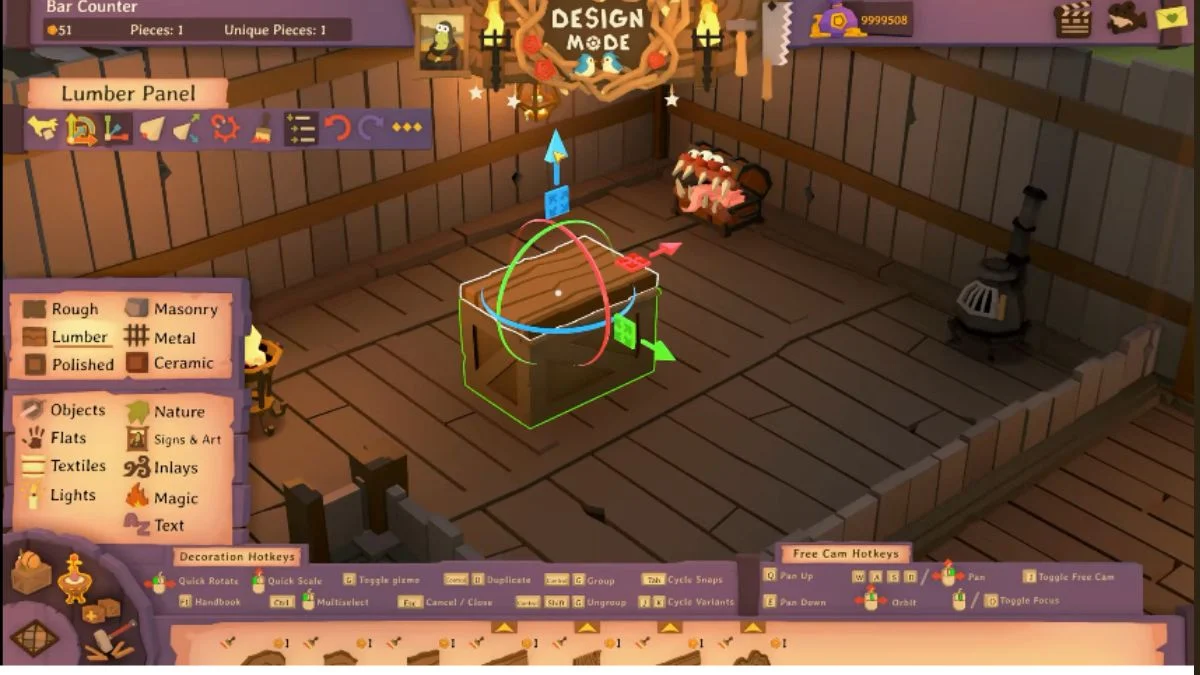
The key to managing tavern decorations lies in Design Mode. Accessible by pressing T during gameplay, Design Mode lets you interact directly with each item in your tavern, like decorations, and more. It’s a versatile tool designed not only for placing items but also for adjusting, moving, and removing them.

Step-by-Step Guide to Removing Decorations
- Enter Design Mode
Press T to activate Design Mode. Your cursor will change, signaling that you can now interact with items in your tavern. - Select the Item
Click on the decoration you want to remove. Items placed on tables, shelves, or counters may appear “welded” to their surface, but selecting them in Design Mode isolates them from the furniture. - Delete the Decoration
Once selected, simply press Delete on your keyboard or right-click to access the contextual menu and choose Delete. The item will vanish without affecting the table or other furniture. - Reposition or Replace (Optional)
If your goal is to move rather than remove the item, click and hold the decoration, then drag it to a new location. This is perfect for experimenting with different layouts without wasting resources.
Tips for Efficient Tavern Decoration Management
- Avoid Deleting Furniture Unnecessarily: Many new players think removing decorations requires selling the whole piece of furniture. Design Mode eliminates that need.
- Use Tutorials Wisely: The in-game Item Workshop tutorial provides foundational guidance for interacting with objects in Design Mode.
- Experiment with Placement: Take advantage of the ability to move decorations freely in Design Mode before committing to a final layout.
By following these simple steps, managing your tavern’s aesthetic becomes a seamless part of gameplay. No more accidental deletions, wasted gold, or frustration: just smooth, creative control over every mug, basket, and trinket in your establishment.
More Trending Game Guides:


Leave a Reply