

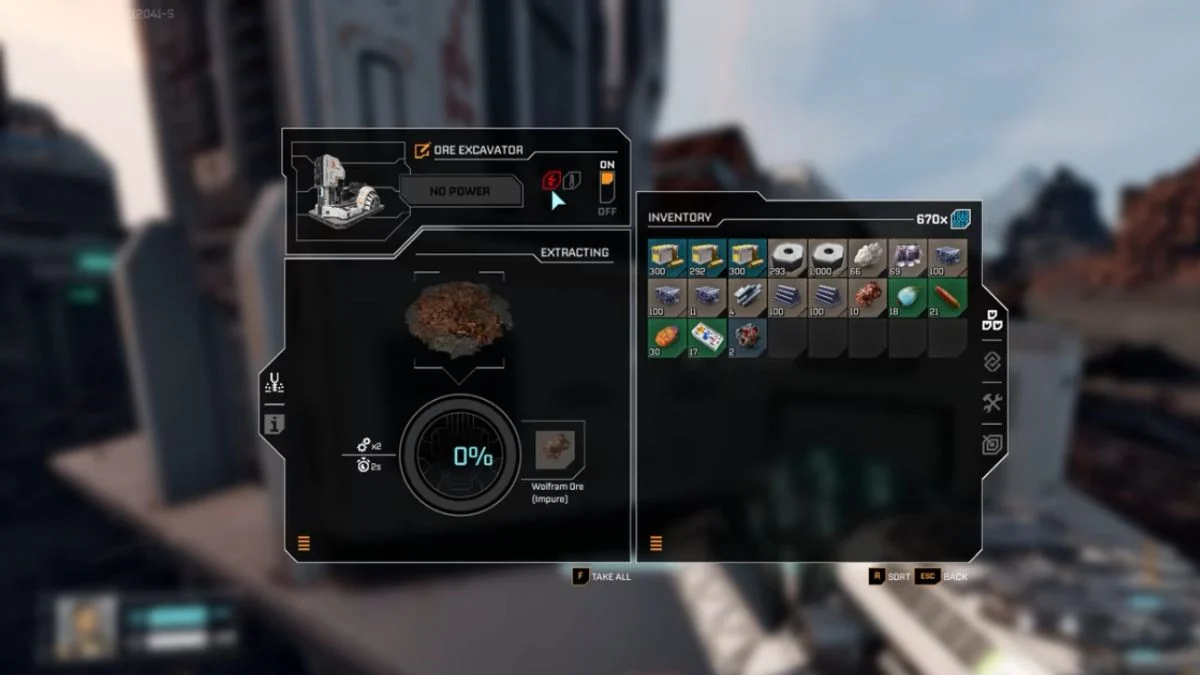
Power is the lifeline of every working factory in StarRupture, yet the game explains surprisingly little about how the system functions. The result is always the same. You place your first Ore Extractor, but it refuses to turn on.
This guide breaks down how power actually travels in StarRupture, how to connect machines correctly, and how to fix the common mistakes that stop your extractor from waking up. Once you understand the grid, your factory flows smoothly, and nothing sits idle.
How Power Works in StarRupture
StarRupture uses shared grid power, not cables. You never place power lines. Instead, power travels naturally through rails, platforms, walkways, and any structure that physically connects to a powered grid.

If a machine touches the grid, it has power. And if it sits on its own, it does not.
This design confuses new players because many expect wire-based systems, but StarRupture treats every structural link as a conductor.
How Power Travels Through Your Factory
Power spreads like a network through:
- Rails
- Platforms
- Walkways
- Any structure connected to the Base Core or a Solar Generator
When your factory grows, this grid becomes one long chain. As long as each piece physically touches the next, power moves effortlessly through it.
If a support floats a few centimeters away or a platform sits unlinked, power stops at that point and the machine beyond it shuts down.
How to Power an Ore Extractor
This simple layout always works and helps you understand the flow.
- Place a Base Core.
- Place a Solar Generator connected directly to the Base Core.
- Place the Ore Extractor on an ore node.
- Connect the Ore Extractor to your factory using a rail.
- Make sure the rail support touches a powered platform or walkway.
Once the rail becomes part of the powered grid, the Ore Extractor activates on its own. If it is connected, it turns on, and if it is disconnected, it stays dead.

Common Power Problems in StarRupture
Most issues come from small breaks in the grid.
Gaps between rails and platforms
Rails that appear close but do not actually touch the platform will not carry power. Every connection point must link directly.

Solar Generators placed on unlinked platforms
A generator that sits on a floating platform cannot power anything. The generator must share the same grid as your factory.
Too many machines for your total power output
If everything is connected but the factory drains more power than your generators produce, machines shut down. Adding more Solar Generators solves this instantly.
Stairs and raised structures that break the grid
Some players connect rails across stairs or sloped sections without linking them to the main platform, which isolates the structure.
Always make sure each section touches the powered grid.
How to Check if a Machine Has Power
Powered machines activate immediately.
If your Ore Extractor shows no animation or output:
- Follow the rail backward.
- Look for a missing connection or a floating support.
- Reconnect the gap.
The machine switches on the moment the grid completes.
Understanding Grid Boundaries
Each Base Core has a build boundary around it. You can only place another Base Core once you step outside this area. Knowing these limits helps you plan large factories without breaking the power network.
More Trending Game Guides & News:


Leave a Reply