

For fans who have completed Duskwood, the story doesn’t have to end there. Everbyte added a clever bridge between their games by introducing the Duskwood completion code. This unique code allows you to unlock a hidden side-story in Moonvale, connecting the two games in subtle yet meaningful ways. If you’re wondering how to use it, here’s a clear, step-by-step guide.
What Is the Duskwood Code?
At the conclusion of Duskwood, players receive a special code. This code is personal to your playthrough and acts as a key to unlock crossover content inside Moonvale. Without it, Moonvale functions as a standalone story. With it, however, new layers of dialogue and character interactions are revealed, giving fans a chance to glimpse what happened after the events in Duskwood.
How to Enter the Code in Moonvale
Step 1: Finish Duskwood
Complete the main story in Duskwood. At the end, you’ll be given a unique code. Be sure to save or note it down, as you’ll need it for the next game.

Step 2: Launch Moonvale
Download and open Moonvale on your device. Start the story as you normally would.
Step 3: Play Until the Name Prompt
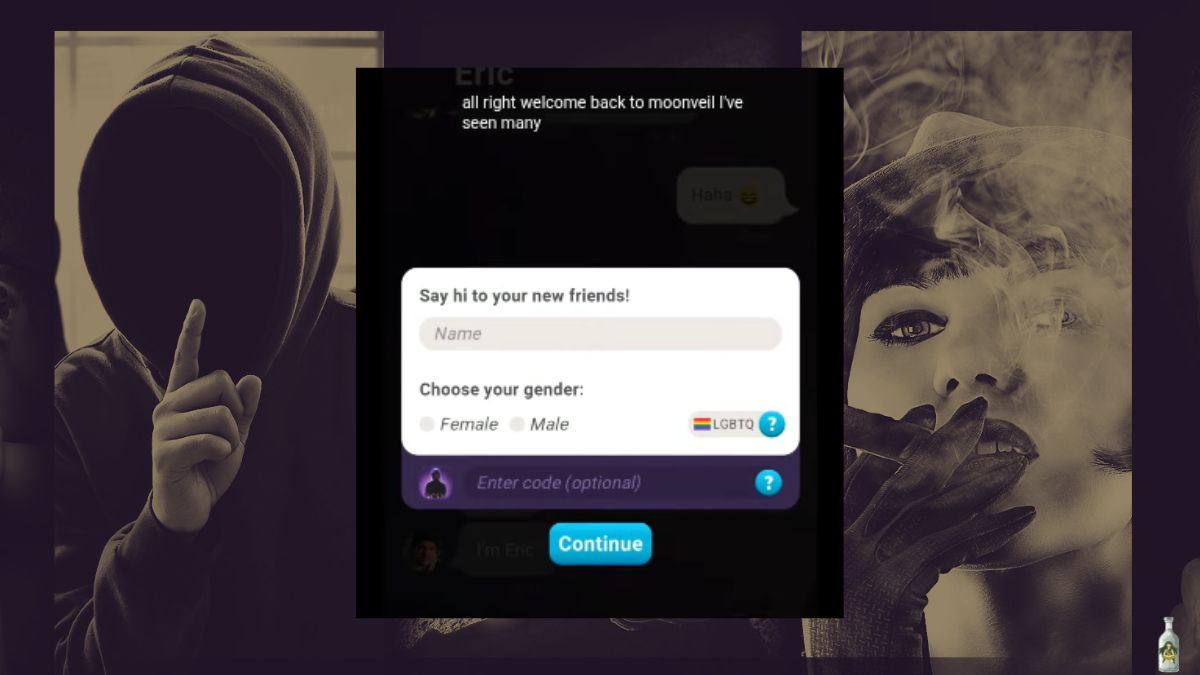
In the opening sequence, while interacting with Eric, you’ll encounter a prompt. After a few minutes of dialogue, he will ask for your name.

Step 4: Look for the Code Entry Option
Beneath the name entry box, you’ll see an option to enter your Duskwood code. This only appears at this exact moment, so pay attention when prompted.
Step 5: Enter Your Code
Type in the code exactly as it was given to you in Duskwood. Make sure to enter it carefully to avoid typos.
Step 6: Unlock the Side-Story
If entered correctly, the code will activate exclusive scenes and dialogues connected to Duskwood. Familiar characters and references from the earlier game may appear, adding a richer context to Moonvale.
Can You Re-Enter this Code Later?
If you missed the chance to enter your code the first time, don’t worry. Restarting the episode will give you another opportunity to use it.

Burning Question: Are Duskwood and Moonvale Connected?
Final Thoughts
Using the Duskwood code in Moonvale is more than just a fun Easter egg. It’s a way to bridge two stories and reward players who followed the mystery to the end. While Moonvale is its own independent tale, the side-story provides valuable closure for those still curious about the aftermath of Duskwood.
By following the steps above, you’ll ensure you don’t miss this hidden connection and you’ll get the most out of both games.
More Gaming Guides & News For You:


Leave a Reply