

As your settlement grows in Pokémon Pokopia, keeping tabs on every Pokémon becomes genuinely tricky. They wander, they roam, and before long one of your favourites has vanished from its habitat entirely. Fortunately, the game includes a smart built-in tracking system that removes all the guesswork, and once you know how it works, locating any missing Pokémon takes only seconds. This guide also covers the trickier situation of homeless Pokémon, which require a different approach entirely.
Quick Overview: Missing Pokémon Methods in Pokemon Pokopia
| Detail | Information |
| Main Tool | Pokédex tracking system |
| Method 1 | Use Honey on the Pokémon’s habitat |
| Method 2 | Use Fly or Teleport ability via a travel Pokémon |
| Method 3 | Search via Pokédex (hover + press Plus button) |
| Method 4 | Check PC terminal outside Pokémon Centre (press minus button) |
| Method 5 | Time travel to the next day (Not Recommended for Cautious Players) |
| Method 6 | Save, exit, and reload the game |
| Fly Example Pokémon | Pidgey |
| Teleport Example Pokémon | Abra |
| After Finding Pokémon | Travel Pokémon automatically returns home |
| Honey Source | Combee (via Pretty Flower Bed habitat) |
| Homeless Pokémon Fix | Rebuild matching habitat, save and exit, reload |

Why Do Pokémon Go Missing in Pokopia?
Before jumping into solutions, it helps to understand why Pokémon disappear in the first place. Several confirmed situations can cause this:
- Pokémon wander away from their assigned habitat naturally while exploring the map
- Each biome only loads 20 to 30 Pokémon at a time, so Pokémon can effectively vanish from view even if they are technically still present in the world
- Removing or restructuring a habitat while a Pokémon is away can leave it homeless, causing it to linger at the old location or disappear entirely
- Homeless Pokémon are subject to the same spawn limit, meaning a homeless Pokémon may not physically appear in the world until the conditions are right
- Building roads allows Pokémon to travel further, meaning they can stray much further from home than intended
- Assigning a Pokémon to a building task temporarily removes it from its habitat and makes Honey ineffective
- Certain Pokémon disappear at specific times of day, reappearing later when conditions change
Understanding these causes helps you choose the right fix immediately rather than trying every method one by one.
Missing vs Homeless: What Is the Difference?
This distinction is important because the two situations require different solutions.
| Situation | Description | Honey Works? | Pokédex Search Works? |
| Missing Pokémon | Has a habitat but is wandering or not rendering | Yes | Usually yes |
| Homeless Pokémon | Has no habitat assigned; listed as homeless in PC | No | No (other Pokémon won’t know its location) |
A homeless Pokémon is one that has lost its habitat, either because you removed it during reorganisation or accidentally took a key item from the habitat. The Pokédex search feature will not work for homeless Pokémon because other Pokémon in the world genuinely have no information about where it is. Honey also does not work because the Pokémon no longer has a habitat to return to.
You can confirm whether a Pokémon is homeless by visiting the PC terminal outside the Pokémon Centre and pressing the minus (-) button. This brings up a happiness list for all your Pokémon, with homeless Pokémon listed at the bottom.
Method 1: Use the Pokédex Search Feature
The quickest first step when a Pokémon goes missing is to check the Pokédex directly. Note that this method only works reliably for Pokémon that still have a habitat.

Step 1: Open the Pokédex menu and locate the Pokémon you are looking for.
Step 2: Hover your cursor over the Pokémon entry and press the Plus (+) button.
Step 3: Once activated, you can ask nearby Pokémon where to find the missing one. They will give you a general indication of its location on the map.
However, if the Pokémon is homeless, other Pokémon will tell you they have no idea where it is. In that case, skip ahead to the homeless Pokémon solutions below.

Method 2: Check the PC Terminal for Homeless Pokémon
If a Pokémon is listed as homeless or you suspect it has lost its habitat, the PC terminal outside the Pokémon Centre is your first port of call.
Step 1: Head to the terminal outside the Pokémon Centre.
Step 2: Press the minus (-) button to bring up the full happiness list for all your Pokémon.
Step 3: Scroll to the bottom of the list where homeless Pokémon appear separately. This confirms which Pokémon are currently without a home, even if they are nowhere to be found in the world.
This does not tell you where the Pokémon physically is, however it confirms its status and helps you decide which fix to apply next.
Method 3: Use Fly or Teleport to Travel Directly to a Missing Pokémon
This is the fastest and most reliable method for tracking down any missing Pokémon that still has an assigned habitat. By combining the Pokédex with a travel ability Pokémon, the game navigates directly to the missing Pokémon’s exact location automatically.

Step 1: Open your Pokédex Locate the missing Pokémon in your Pokédex list. Selecting it prepares the game to track its current position anywhere on the map.
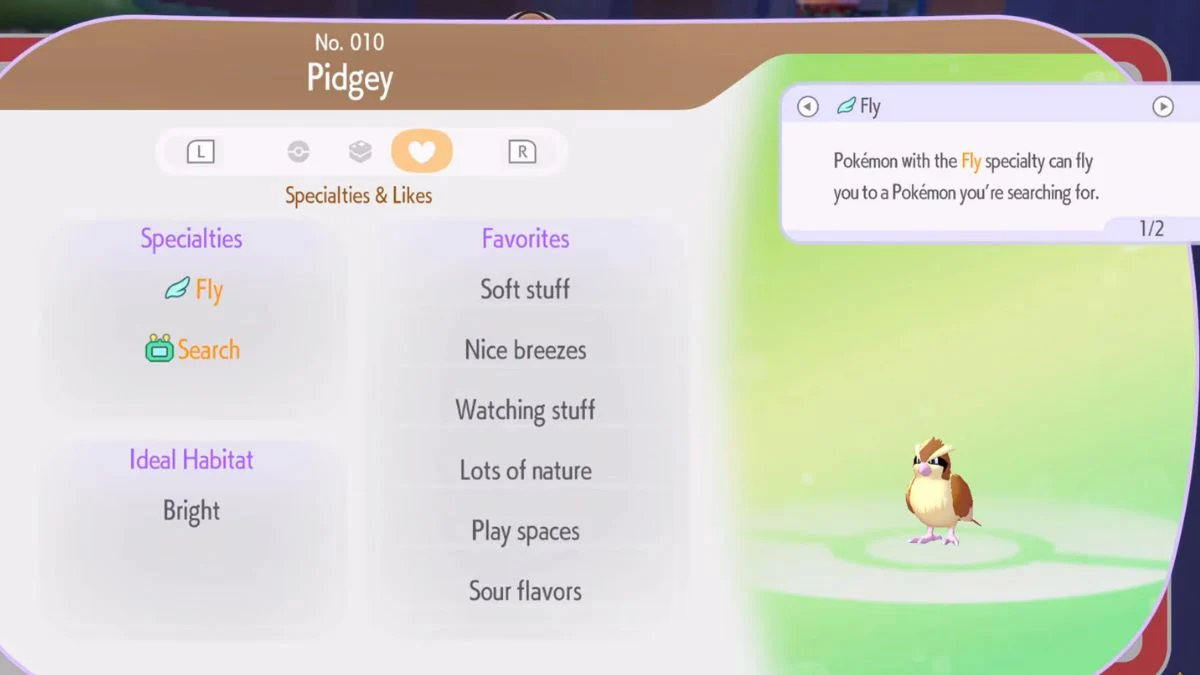
Step 2: Find a Pokémon with Fly or Teleport You need a Pokémon with one of these two movement abilities. Pidgey is a common early-game option for Fly, while Abra covers Teleport. Having at least one of these available in each biome is strongly recommended as your settlement expands.
Step 3: Ask the travel Pokémon to follow you Approach the Fly or Teleport Pokémon and make it follow you before activating the tracking sequence.
Step 4: Select the missing Pokémon from the Pokédex With your travel Pokémon following you, open the Pokédex and select the missing Pokémon. Then talk to your travel Pokémon to initiate fast travel.
Step 5: Let the travel animation complete If you are using Pidgey, it picks up your character and flies directly to the missing Pokémon’s location. Abra teleports you there instantly. The game handles all navigation automatically.
Step 6: Interact with your missing Pokémon Once you arrive, the missing Pokémon is right in front of you. Guide it back to its habitat or interact with it however you need.
Step 7: Travel Pokémon returns home automatically After the tracking process completes, your Fly or Teleport Pokémon automatically returns to its own home without any input from you. You can repeat the process as many times as needed if multiple Pokémon are missing at once.
Fly and Teleport Pokémon: Who to Use

| Pokémon | Ability | Notes |
| Pidgey | Fly | Common early-game option; easy to obtain |
| Abra | Teleport | Instant travel; no flight animation |
| Other Fly Pokémon | Fly | Any Pokémon with Fly specialty works |
| Other Teleport Pokémon | Teleport | Any Pokémon with Teleport specialty works |
Because each biome operates independently, having at least one Fly or Teleport Pokémon placed in every biome is the best long-term setup. However, if you currently have multiple Fly or Teleport Pokémon concentrated in one biome, consider transferring one to a biome that does not have coverage yet.
Method 4: Use Honey to Attract a Missing Pokémon
Sometimes a Pokémon does not appear anywhere on the map at all, even after using Search or fast travel. This happens because each biome only loads 20 to 30 Pokémon at a time, which can cause certain Pokémon to simply not render in the world. In this case, Honey is your best tool, as long as the Pokémon still has a habitat.
Important: Honey only works for Pokémon that have an active habitat. If the Pokémon is homeless, using Honey near where its habitat used to be will not work.
How to use Honey: Take Honey out of your inventory, stand near the Pokémon’s habitat, and press the A button. The Pokémon will spawn in and return to its home location.

How to get a reliable supply of Honey:
Step 1: Build a Pretty Flower Bed habitat by placing four Wildflowers in a square formation next to each other.
Step 2: Wait for Combee to appear and settle into the habitat.
Step 3: Allow Combee to use its Litter Specialty, which causes it to drop items around its habitat periodically. Because Combee is a bee Pokémon, it drops Honey frequently and consistently.
Step 4: Collect the Honey from around the habitat whenever Combee drops it. Honey can also drop randomly from flower tiles if you do not yet have Combee.
Note that Honey works for virtually every Pokémon in the game that has a home. However, if a Pokémon is currently assigned to a building task, using Honey on its habitat will not work until the task is complete.
Method 5: How to Find a Homeless Pokémon
This is the trickiest situation in the game and the one that catches the most players off guard. When a Pokémon becomes homeless, the Pokédex search fails, Honey does not work, and Fly or Teleport may not be able to locate it either. Here are the confirmed community solutions:
Fix 1: Rebuild a matching habitat, then save and exit Check the Pokédex to confirm what habitat type the homeless Pokémon prefers. Build a suitable habitat that matches those requirements, then save your game and exit. When you log back in, the Pokémon should appear near or inside its new home. This may take more than one attempt, however players confirm it consistently works eventually.
Fix 2: Time travel to the next day (Not Recommended for Cautious Players) Opening the Switch 2’s system settings and advancing the date forward by one day forces a world refresh that brings homeless Pokémon back into the world. Multiple players confirm this works reliably, including the original Reddit poster who resolved their missing Squirtle this way.
Fix 3: Simply wait If you prefer not to time travel, waiting in-game for time to pass naturally can also trigger the Pokémon to reappear. Certain Pokémon disappear at specific times of day and return when conditions change. However, this is the slowest option.
Fix 4: Use a Pokémon-specific item or doll For certain Pokémon, placing a specific associated item or doll on the ground near their old habitat area will draw them to it directly. One confirmed example involves Driffloon, which can be called back by placing its doll on the ground. When one player found a doll while walking through a gate, they received a prompt to call Driffloon, which resolved the issue instantly.
Homeless Pokémon Fix Summary
| Situation | Solution |
| Pokémon has a habitat but won’t spawn | Use Honey near habitat, press A |
| Pokémon is listed as homeless in PC | Rebuild matching habitat, save and exit, reload |
| Pokémon-specific fix (e.g. Driffloon) | Place matching doll on ground to call it back |
| Nothing is working | Wait for natural time to pass; certain Pokémon are time-dependent |
| Pokémon assigned to a building task | Wait for task to complete before using Honey |
Where to Check First When a Pokémon Goes Missing
Before using any tracking method, these locations are worth checking manually since missing Pokémon often turn up in predictable spots:
| Location | Why to Check |
| Nearby habitats | Pokémon frequently visit and chat with other Pokémon near neighbouring habitats |
| Old habitat location | If you removed a habitat, the Pokémon may still be standing exactly where it used to be |
| Along roads | Roads allow Pokémon to travel further, so check the full length of any roads near their home |
| Building sites | Pokémon assigned to construction tasks will not appear in their habitat until the task finishes |
| Other biomes | If you recently moved houses or restructured areas, the Pokémon may have followed to an adjacent biome |
| PC terminal happiness list | Press minus at the terminal outside the Pokémon Centre to see if the Pokémon is listed as homeless |

How to Prevent Pokémon from Going Missing
Tracking down missing Pokémon is straightforward once you know how, however preventing disappearances entirely saves even more time. Here are the confirmed methods for keeping your Pokémon close to home:
Build them a house. Pokémon with a dedicated home that includes a piece of Relaxation furniture will sleep there during certain times of day, making them much easier to locate consistently. Players who moved their Pokémon into blueprint-built houses reported significantly fewer disappearance issues.
Place houses near each other. Pokémon that enjoy socialising will naturally gravitate toward friends who live nearby. Clustering houses keeps the general population in one area rather than scattered across the map.
Build roads carefully. Roads allow Pokémon to move faster and travel further, which is useful but also means they can stray far from home. Plan road placement to guide Pokémon toward central areas rather than away from them.
Keep each biome’s population manageable. Since each biome loads only 20 to 30 Pokémon at a time, keeping the Pokémon count in each area at or below that threshold prevents the disappearing act caused by the loading limit. You can check the current population of each biome through that area’s PC.
Never remove a habitat before giving the Pokémon a new home. The most common cause of homeless Pokémon is removing or reorganising habitats while the Pokémon is away. Always build the new habitat first and confirm the Pokémon has moved in before dismantling the old one.


Leave a Reply