

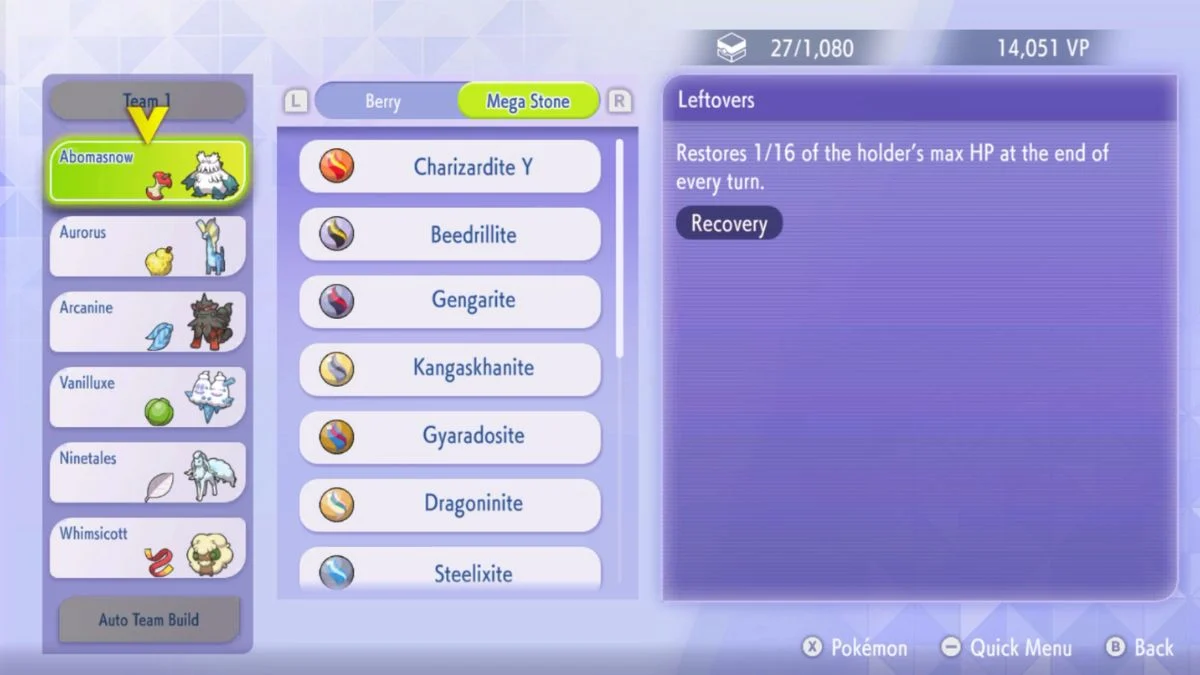
Pokémon Champions brings Mega Evolution back into competitive play, and it is one of the most exciting mechanics in the game. However, the Item UI is a little unintuitive at first, and many players are struggling to find where their Mega Stones actually sit in the menu. If you just picked up a Lucarionite or any other Mega Stone and cannot figure out how to equip it, here is exactly what you need to do.

Before You Start Equipping Mega Stones
You cannot equip a Mega Stone in Pokémon Champions without meeting two conditions first:
- You must have completed the game’s tutorial. The full item menu does not unlock before this.
- Your Pokémon must be capable of Mega Evolving. Only compatible Pokémon will accept the corresponding Mega Stone.
Once you have both of those sorted, you are ready to equip.
How to Equip a Mega Stone in Pokémon Champions
The reason most players get stuck is that Mega Stones do not appear under the default item tabs. The menu opens on “Recent” and “Stat Boost” items, and Mega Stones sit in a separate tab that you have to scroll to manually. Follow these steps to get there:
- Register your Pokémon to a Battle Team. The Pokémon you want to Mega Evolve must be on an active Battle Team.
- Open the Item dropdown menu.
- Press R to cycle through the item tabs. Keep pressing R until you reach the Mega Stone tab. It is not visible from the opening screen, so you will need to scroll past the default categories.
- Select your Mega Stone and equip it to the relevant Pokémon.
- Load into battle. Your Pokémon is now ready to Mega Evolve once the battle begins.
The key step that trips most players up is Step 3. The Item UI defaults to general held items, so pressing R to reach the dedicated Mega Stone tab is the part most people miss.

NEXT STEP:
Common Issue — Mega Stone Not Showing Up
If you opened the item menu and only see “Recent” and “Stat Boost” categories, you are looking at the wrong tab. This is the default view and does not display Mega Stones. Simply press R to scroll right through the tabs until the Mega Stone category appears.
Also, keep in mind that each Mega Stone only works with its corresponding Pokémon. For example, Lucarionite only works on Lucario. Equipping it to a different Pokémon will not trigger Mega Evolution.
How to Get Mega Stones in Pokémon Champions
Mega Stones are obtainable through a collaboration event. You can move Pokémon from Pokémon Legends: Z-A to Pokémon Champions via Pokémon HOME to receive Mega Stones. This is currently the confirmed method available at launch.


Leave a Reply